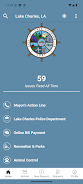
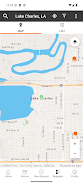
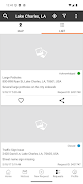
OneLC Action Line puts LC Connect in your pocket and offers a direct, practical way for Lake Charles residents to report non-emergency neighborhood issues, attach supporting photos, and follow progress until cleanup or repair is complete. The OneLC Action Line app is designed as a single hub for municipal requests, city resources, and community event information so users can find services, submit concerns, and stay informed without needing to visit a city office. Whether you want to flag a pothole, report an overgrown lot, or notify officials about a damaged sidewalk, this app streamlines submission and keeps a clear record of each request from start to finish.
Key Features
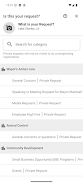
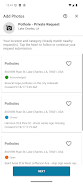
The app supports photo attachments and descriptive fields that let you provide clear evidence and context for each report; this helps city crews assess the issue more accurately. OneLC Action Line includes an intuitive request form where you can describe the problem, add pictures, and specify approximate location details or an address so staff can locate the issue. The interface centralizes status updates so you can check whether a report is new, under review, scheduled for work, or closed. In addition to reporting, the app highlights community events, city programs, and resource links that make it easier to find services offered by the municipality.
How it works
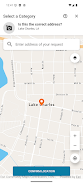
Submitting a report is a simple three-step flow: capture or attach photos, add a short description with location details, and send. The app queues your submission to the municipal system and provides an in-app record you can revisit at any time. Visual thumbnails and an itemized timeline give a clear view of progress on each request, and you can update or supplement a report with additional evidence if conditions change. The design emphasizes quick, low-friction reporting so residents can spend less time on paperwork and more time on meaningful civic engagement.
User interface and controls
The user interface uses clear labels, large input fields for descriptions, and obvious buttons for attaching photos and submitting reports to reduce errors and speed up the process. Photo tools include basic preview and the ability to replace images before sending; text fields support short, focused descriptions to communicate the problem efficiently. Controls are optimized for one-handed use on phones: the submission button, photo picker, and location or address field are placed in predictable spots so even first-time users can complete a report quickly. The app also groups municipal information into easily scannable cards that show events, resources, or program details relevant to residents.
Progress tracking, updates, and user notifications
Once submitted, your request appears in a centralized status view where each update is timestamped and explained in plain language so you can see what stage the work is in. In-app update messages help you understand whether a request is awaiting inspection, scheduled, or closed. For convenience, OneLC Action Line supports optional alerts so you can receive a notification when a status changes or when additional information is requested by municipal staff. All activity is stored in the app, giving you a simple history of interactions with city services for future reference.
Accessibility, offline use, and reliability
The app is built to be accessible to a wide range of users, with readable fonts, clear contrast, and straightforward navigation that minimizes complexity. If you start a report while offline, you can save it as a draft and submit when a connection is available, preventing lost work and making reporting practical in areas with intermittent coverage. Error messages are written in plain language and offer next-step guidance so users know how to correct issues or retry submissions. These design choices help ensure residents can rely on the app when they need it most.
Customization and ongoing engagement
OneLC Action Line lets you manage how you interact with municipal content: choose whether to receive event highlights, resource announcements, or only status updates about reports you file. The app’s streamlined layout emphasizes clarity over clutter, but it still allows you to follow topics that matter to your neighborhood so you can stay engaged with relevant city programs. Regular use creates a useful archive of historical reports that can help residents track recurring problems and advocate for long-term solutions.
Limitations and important notes
The service is focused on City of Lake Charles municipal services and is intended for non-emergency reports; it should not be used in place of emergency response systems. Response times vary according to city schedules and priorities, so tracking a request in the app indicates progress but does not guarantee immediate action. For urgent public-safety incidents, please contact emergency services through the appropriate channels. The app is intended to make civic reporting easier and more transparent, while respecting the operational limits of municipal workflows.