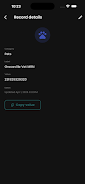
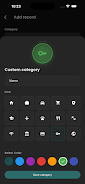
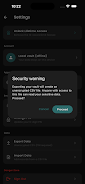
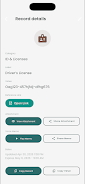
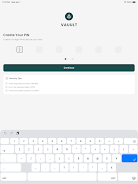
Vauult is an offline-first utility that helps you securely store, organize, and protect sensitive text on your personal device using AES-256 encryption. Vauult is built for people who want local control over PINs, passwords, seed phrases and private notes, and Vauult keeps all data stored on the device without transmitting information to external servers. The app emphasizes privacy, simplicity and straightforward control: it provides a dependable place to keep confidential text where only you can access it, without relying on cloud services or third-party storage.
Key features
At its core, Vauult offers encrypted, local storage for plaintext entries with a focus on clear organization and reliable protection. Entries are stored using AES-256 encryption so sensitive items such as recovery phrases, account passwords and private notes remain encrypted at rest. The application is designed to work offline, eliminating the need for an internet connection and reducing exposure to network-based risks. Vauult supports basic entry operations—create, edit, rename and delete—so you can manage your confidential text quickly and without unnecessary complexity.
How it works
Vauult operates entirely on-device: when you create a new entry the text is encrypted and saved locally, and when you open an entry it is decrypted only for as long as you view it. Because no external transmission occurs, all cryptographic operations and key handling remain on your device. This behavior makes Vauult a useful tool for people who need a private, offline vault for sensitive strings of text. The app is optimized for minimal permissions and does not rely on remote services to function.
User experience and controls
The interface is intentionally simple so common tasks are fast and unambiguous. Basic controls include creating new entries, searching by title or content, opening an entry to read or edit, and safely removing items you no longer need. Navigation follows standard mobile patterns so most users will find the learning curve short: lists of entries lead to detail screens where text can be viewed or updated. Vauult focuses on responsive, touch-based controls and clear on-screen prompts to reduce mistakes when handling sensitive information.
Organization, progression and long-term use
Vauult helps you build a personal collection of sensitive text over time without prescriptive workflows. You can organize entries with descriptive titles and simple grouping techniques that make it easy to locate data as your collection grows. There is no competitive progression system; instead the app provides functional ways to maintain and curate entries so the vault remains useful and manageable as you add more items. Regular maintenance—reviewing, pruning and renaming entries—keeps the vault practical for daily use.
Visual style and customization
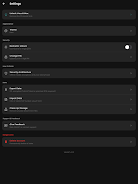
The visual approach is deliberately minimal and distraction-free, emphasizing legibility and contrast for quick reading of short or long text items. Typography and spacing prioritize clarity on small screens, and basic customization options such as adjustable text size and theme preferences let you adapt the experience for comfort. The interface avoids unnecessary animations or decorative elements so focus stays on content and secure handling of entries.
Security, privacy and offline resilience
Vauult prioritizes cryptographic strength and local privacy. Using AES-256 encryption ensures that stored text remains protected while on the device. Because the app does not send data to remote servers, it reduces the attack surface associated with cloud-based storage. Users are responsible for device-level protections and backups: if a device is lost or permanently damaged without a backup, encrypted data stored only on that device may be irrecoverable. Plan and perform regular secure backups using your device’s backup utilities or local methods you trust.
Accessibility, offline play and usability
Vauult is fully functional without an internet connection, making it suitable for situations where connectivity is limited or unavailable. The app aims to be accessible through clear labels, scalable text and support for standard screen-reader behavior on Android. Because the feature set is focused and local, Vauult is straightforward to use repeatedly over long periods: it is a practical tool for anyone who needs a private repository of short, sensitive text items.
Limitations and recommended practices
Vauult does not provide automatic cloud synchronization or cross-device replication; entries remain on the single device where they were created unless you explicitly transfer them. This design prevents unwanted exposure but increases responsibility for backups and device security. To get the most from Vauult, adopt a consistent backup routine, use strong device-level authentication, and treat exported copies with the same care you would give the original entries. These practices help maintain the confidentiality and availability of your sensitive text while preserving the offline, privacy-first benefits Vauult provides.