GetUP Alarm pairs a smartphone app with a small physical checkpoint to stop habitual snoozing and rebuild reliable wake-up routines. GetUP Alarm starts with a simple promise: set your alarm on the phone, place the GetUp Brick across the room, and the sound will only stop when you physically walk over and tap your phone on the brick. The core idea behind GetUP Alarm is behavioural design — introducing a small amount of required movement and friction that reliably interrupts the groggy inertia that leads to repeated snoozes and accidental morning scrolling.
Key features and practical details
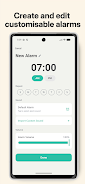
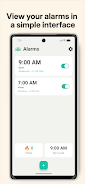
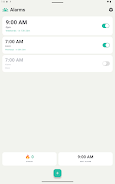
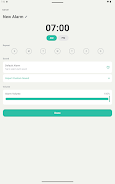
This app uses an NFC checkpoint (the GetUp Brick) as the single, enforced method to silence alarms so you can’t dismiss an alarm from the bedside. Alarms are fully customisable with selectable tones, volume and vibration settings, repeat schedules for weekdays or custom days, and individual Alarm Profiles for different routines. The interface focuses on clarity: large controls to set times, previews to listen to tones before you save them, and a straightforward schedule editor that shows upcoming alarms and their repeat rules. Because the silencing action requires an NFC tap, the app blocks quick digital dismissal and reduces the temptation to start doom-scrolling immediately after the alarm ends.
How it works — controls, mechanics and user flow
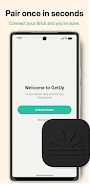
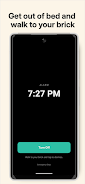
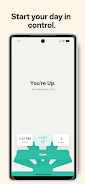
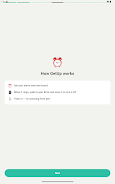
Using the app is intentionally simple. After a short setup that verifies your phone’s NFC function and pairs it with the GetUp Brick, you create an alarm by choosing a time, sound, and repeat pattern. When the alarm sounds you must walk to the physical checkpoint and tap your phone to the Brick to stop the alarm; this single-control model prevents snooze abuse. Controls in the app include on/off toggles for each alarm, the ability to edit or duplicate existing alarms for fast schedule creation, and a test mode so you can confirm placement and loudness without waiting for the actual alarm time. The app is designed to work without an internet connection: once alarms are configured they will trigger locally on the device, which is important for travel, offline use, or restricted connectivity environments.
Customization, placement and progression
Personalisation is practical rather than flashy. You can choose tones that suit you — from gentle to assertive — and set vibration patterns for those who prefer tactile feedback. Placement of the GetUp Brick becomes a simple way to control difficulty: starting with a Brick near the doorway helps light sleepers, while positioning it across the room or down a hallway increases the physical commitment required to turn the alarm off. Over time users report a natural progression in their mornings: once the behavioral friction is established, many find it easier to create consistent wake times and smoother pre-day routines without needing additional features or gamified incentives.
User experience, accessibility and device compatibility
The user experience emphasizes clarity and accessibility. Buttons and toggles are designed to be large and readable; volume and vibration controls are available separately for users with hearing or sensory preferences. Because GetUP Alarm relies on NFC, it requires an Android phone with NFC hardware and permissions enabled; the app will check compatibility during setup and provide on-screen guidance if adjustments are needed. Alarms run locally so the app remains reliable even when offline, and the setup flow explains how to place the Brick for best results and how to test the connection before relying on it for important mornings.
Replay value and long-term benefit
Though not a game, GetUP Alarm encourages repeat use through consistent real-world payoff: arriving on time, reducing rushed mornings, and avoiding the negative habit of immediate phone use. The simple interaction model and incremental habit reinforcement mean the app offers sustained value for people who struggle with chronic snoozing or who want to build a calmer morning routine. Because the mechanism is physical rather than purely digital, the experience scales with small changes in placement or alarm settings rather than relying on novelty to remain useful.
Limitations and considerations
GetUP Alarm requires a physical checkpoint, and its strict no-snooze design will feel too rigid for users who depend on gradual wake-up options. The solution depends on a compatible phone with NFC and on placing the GetUp Brick away from the bed; without those conditions the core behavior will not be enforced. The app intentionally avoids complex gamification or cloud sync features to remain reliable offline, so users seeking online backup, leaderboards, or social features should note those capabilities are not part of this utility.
About the creators
The app was developed by a small team led by a former chronic snoozer who focused on practical, behavior-driven design rather than gimmicks. The developers built GetUP Alarm from real personal experience and user feedback, aiming for an honest tool that solves a common morning problem with minimal fuss and maximal reliability.