Stuffrite modernizes personal budgeting by combining envelope-style money management with an interactive Time Machine projection so you can see future balances and test scenarios before they affect your accounts. Stuffrite creates virtual envelopes for recurring bills, savings goals and daily spending, offers an Account Mirror Mode to reflect actual bank balances, and provides Autopilot and Horizons tools to move funds toward priorities automatically. The app emphasizes privacy-first local storage and a predictable, visual approach to reduce guesswork around overdrafts and shared expenses.
Key Features
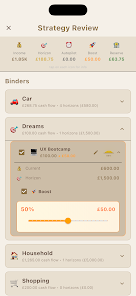
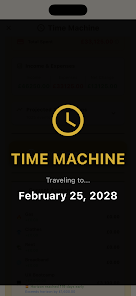
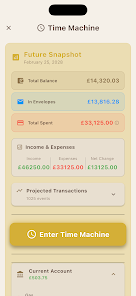
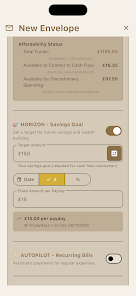
Stuffrite's Time Machine projects forward-looking account balances by applying scheduled bills, income, and habit patterns to forecast how your balance will change over days, weeks or months; use it to simulate a purchase or a change in spending to see the impact before it happens. Envelope budgeting in Stuffrite lets you assign money to named envelopes for rent, utilities, groceries, entertainment or bespoke goals, and those envelopes are visualized so you always know what funds are reserved. Account Mirror Mode connects envelope totals to your real account balances so the app avoids showing phantom money and keeps what you plan aligned with what you actually have. Pay Day Cockpit centralizes the moment you receive income: it suggests allocations based on your rules and shows a clear allocation timeline. Autopilot and Horizons reduce manual transfers by moving money incrementally toward savings targets or bill envelopes according to schedules or rules you configure. Workspace Mode supports coordinated budgets by selectively sharing specific envelopes with a partner while keeping full account data private on your device.
Controls and Interaction
Interacting with Stuffrite relies on simple, touch-based controls: tap an envelope to view details, drag to reorder priorities, and use intuitive date pickers to schedule repeating events. Adding a transaction or adjusting a scheduled transfer is a few taps and the interface confirms changes with visual cues so you can review the projected outcome. Settings for Autopilot, Horizons and Account Mirror Mode are presented as clear, named toggles and sliders rather than complex menus, which keeps day-to-day adjustments quick and predictable. The Pay Day Cockpit surfaces only the most relevant controls when you need them so routine operations happen with minimal friction.
Progression, Goals and Challenge Systems
Stuffrite structures progress around goals and timelines rather than levels: as you fund an envelope, progress bars and milestone markers update to reflect proximity to completion. You can set soft or strict deadlines for goals, create rolling savings challenges like a 52-week fund, and use the Time Machine to test whether hitting those targets is realistic under your current habits. Autopilot helps you make steady progress while Horizons allows you to plan stretches of higher savings or reduced spending to meet a specific deadline. These systems create replay value by letting you reconfigure goals, re-run projections, and iterate on budgeting strategies without penalty.
Visual Style and Organization
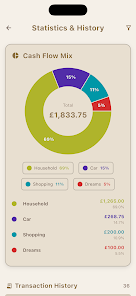
Stuffrite favors a clean, information-focused visual style that balances data density with clarity: envelopes appear as labeled blocks or tiles, the Time Machine projection uses a simple timeline with annotated events, and Pay Day Cockpit presents a compact allocation chart for immediate comprehension. Color and typography are used sparingly to highlight status—funded, underfunded, or scheduled—so you can scan your financial picture at a glance. Views such as the Wall clarify what money stays in your ecosystem versus outgoing obligations, and filters let you focus on bills, savings, or discretionary spending independently.
Privacy, Security and Offline Use
Stuffrite adopts a local-first storage model so the majority of personal financial data remains on your device; the app avoids ad-driven data practices and does not sell personal information. Account Mirror Mode reflects bank balances but can be configured to limit what is shared or mirrored, preserving privacy while maintaining accuracy. Because core functionality—envelope management, projections, and Autopilot rules—works offline, you can use Stuffrite in airplane mode or without a constant network connection; synced or mirrored balances update when a connection is available.
Accessibility and Customization
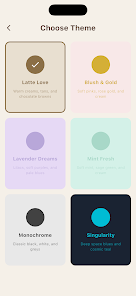
Accessibility features include scalable text, clear contrast, and logically ordered controls to support screen readers and easier navigation. Customization options let you rename envelopes, choose periodicities for scheduled items, adjust Autopilot behavior, and tailor the visual layout to match how you think about money. Workspace Mode's per-envelope sharing gives flexible collaboration without exposing entire accounts, which helps partners coordinate expenses while maintaining individual privacy.
Limitations and Practical Considerations
Stuffrite's envelope budgeting may feel restrictive for people who prefer purely ad-hoc tracking; its forecasts are only as accurate as the scheduled events and habit data you enter, so regular maintenance improves reliability. Workspace Mode requires explicit setup per envelope to share budgets with a partner, so initial coordination is necessary. The design prioritizes predictability and privacy over aggressive automation that makes bank-level transactions without explicit confirmation.
In practical use, expect Stuffrite to be most useful for users who want a proactive, visual way to plan cash flow, avoid overdrafts, and make steady progress on savings goals while keeping tight control over privacy and device-based data storage.