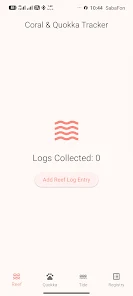
Coral Pale Quokka Lynx is a compact field logging tool designed for marine and wildlife observers who need a simple, structured way to record reef and animal data while working on location. The app focuses on repeatable, timestamped entries and lightweight controls so you can keep your attention on the field rather than on fiddly data entry. Coral Pale Quokka Lynx puts reef counters, behavioral logs, tide measurements and a species registry within quick reach through a consistent, module-based interface.
Key features and interaction mechanics
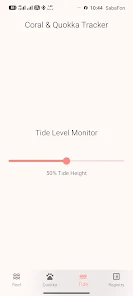
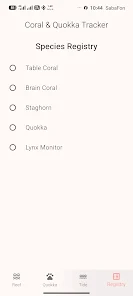
The app’s primary mechanics are intentionally straightforward: increment a session counter for reef surveys, tap predefined behavior buttons for quokka observations, slide a horizontal control to record water height as a percentage, and choose species from a registry to standardize reporting. Each interaction creates a timestamped record and appends it to a searchable history for the current session. The interaction flow is optimized for field use so actions require minimal taps and the most common controls are persistent across screens.
Controls, layout and module structure
The interface uses a persistent bottom navigation bar to switch quickly between four core modules: Reef, Quokka, Tide, and Registry. The Reef module centers on an incrementing session counter and a brief note field; the Quokka module presents behavior buttons that log events with automatic timestamps; the Tide module exposes a horizontal slider for percentage-based water height entry; and the Registry offers a curated list of species to pick from. Controls are large and contrast-focused to aid use in bright daylight or with gloves on.
Progression, session management and replay value
Progression in Coral Pale Quokka Lynx is not gamified but practical: sessions accumulate a compact record that becomes more useful with repeated surveys. Regular use creates a longer history for each survey site and species, enabling quicker comparisons and more reliable long-term monitoring. The replay value comes from the app’s ability to make repeated surveys faster and more consistent, reducing variability between observers and across visits.
Data organization and history
Every logged item is stored with a timestamp and appended to a session history that can be searched by keyword, date or module. The history view is designed for rapid review after a survey and supports simple filtering to find entries by species, behavior or tide percentage ranges. This local history allows observers to perform quick post-field checks without leaving the app.
Visual style and accessibility
The visual design prioritizes legibility and minimal distraction: high-contrast text, clear module labels, and large touch targets reduce errors in challenging field conditions. The app avoids cluttered screens so observers can complete entries from a single view. Accessibility-friendly considerations include a logical control order for screen readers, scalable text sizes, and simple color contrasts to assist users with different vision needs.
Offline use and device considerations
Coral Pale Quokka Lynx is built for on-device recording so observers can continue to log data without a network connection. Timestamped entries and the local history remain available offline; this design ensures that fieldwork is uninterrupted in remote locations. The app currently focuses on reliable local storage and clear session records rather than cloud synchronization or multi-device account systems.
Customization and limitations
The app provides a predefined species registry to help standardize records, which reduces ambiguity during rapid surveys. Customization options are limited in the current release: users should expect the registry to be fixed and data export or advanced synchronization features are not part of the baseline offering. These trade-offs keep the interface simple and reduce the battery and data overhead for field deployment.
User experience tips and challenge handling
For best results, create a new session for each survey site and use the increment counter to track transects or quadrats consistently. Use the Quokka module’s behavior buttons to capture rapid activity bursts and rely on the tide slider for consistent water-height reporting across visits. In high-tempo surveys the combination of buttons and the slider reduces manual typing and helps teams keep pace with dynamic field conditions.
Advantages and ideal use cases
Coral Pale Quokka Lynx excels when you need a fast, reliable way to collect repeatable data with minimal training. The app’s timestamping, searchable history and structured modules are especially useful for researchers, citizen scientists and conservation teams conducting repeat surveys, behavioral watches, or short-term tide monitoring. By emphasizing straightforward controls and offline reliability, it helps observers focus on observations rather than on complex data management.
Known drawbacks and what to expect
While the app streamlines field entry, it does not currently offer advanced customization of the species registry, automated cloud sync, or extensive export formats. Users who require multi-device collaboration or batch export should plan to supplement the app with their own post-field workflows. The development approach favors simplicity and endurance in remote conditions over a broad feature set.