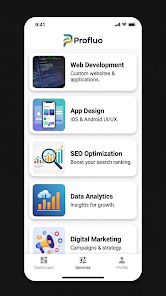
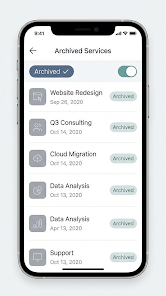
Profluo: Business Management is a compact, mobile-first management app designed for service-based businesses that need to replace spreadsheets and manual tracking. Profluo: Business Management centralizes services, customers, staff and billing in a single interface so operators can spend less time on day-to-day admin and more time on growth and customer care. The app is particularly well suited to hostels, rental shops, gyms and membership clubs because it combines photo-based asset tracking, capacity controls, scheduled invoicing and automated reminders into an approachable workflow.
Key Features
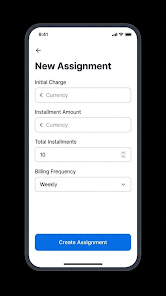
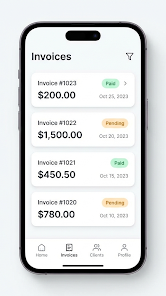
The core features focus on reducing duplication and keeping records consistent. Photo-based service tracking lets you attach one or more images to rooms, equipment or any service entry for instant visual recognition. Archive mode removes seasonal or inactive services from the active lists while preserving their histories for reporting or future reactivation. Capacity control enforces occupancy and availability limits so bookings, rentals or class signups do not exceed what you can deliver. Flexible billing cycles allow you to assign daily, weekly or monthly billing schedules per customer, and a fixed-installment option calculates due dates automatically so recurring invoices stay accurate. Communication tools include timed payment reminders, direct messages to individual customers and broadcast announcements for groups, helping lower the incidence of late payments and missed reservations.
User Experience and Controls
The interface is optimized for mobile devices and built around simple touch controls and clear forms. Adding a new service or customer is accomplished through guided fields and optional photo attachments, minimizing the need for training. Listings support search and filtering to quickly find a customer profile, asset photo or upcoming invoice. Scheduling screens present availability and capacity information alongside current bookings, making it straightforward to assign staff, block dates or adjust limits. Notifications are configurable so teams receive reminders and updates without interrupting core operations.
Workflow Progression and Onboarding
Onboarding in Profluo: Business Management follows a logical progression: define services and assets, attach photos and metadata, set capacity and pricing, and then assign customers and billing schedules. This step-by-step approach mirrors common operational workflows so teams moving from spreadsheets can map existing processes into the app without guesswork. Progression is practical rather than gamified: as you complete setup tasks you reduce manual tasks, move recurring invoices into automation and lower the time spent reconciling bookings. Regular use builds a cleaner audit trail of customer histories, payments and staff actions.
Visual Style, Organization and Level Structure
The visual design emphasizes clarity and quick scanning: photo thumbnails, concise line items and color cues for availability or overdue invoices. The app groups content into logical levels: service listings, individual service detail pages, customer profiles and billing ledgers. Within each level you can view histories, upcoming schedules and permissioned staff notes. This structure makes it easy to drill down from a calendar view into the exact booking or invoice that needs attention, reducing the cognitive load when handling multiple locations or shifts.
Customization, Team Management and Communication
Profluo: Business Management supports role-based permissions so managers can limit which staff members edit services or view financial information. Custom fields allow you to capture business-specific details for assets or customers without cluttering standard screens. In-app messaging and broadcast announcements keep teams aligned on schedule changes, maintenance needs or promotional updates. Because the app stores customer histories, staff can quickly see previous bookings, special requests or payment patterns when interacting with clients.
Reliability, Challenges and Typical Use Cases
The app is built for everyday operational needs: preventing overbooking with enforced capacity, reducing late payments with scheduled invoicing and automated reminders, and maintaining consistent customer records across mobile devices. Typical users include small hotels and hostels, equipment rental businesses, fitness studios and membership clubs that need photo-based asset catalogs and predictable billing. Known trade-offs are realistic: product-focused retailers may find the service-oriented workflow less suited to inventory-heavy sales models, reminder schedules (defaulting to three days before due) may not match every cash-flow preference, and teams accustomed to spreadsheets will need some setup time to align services, billing cycles and permissions. These limitations are manageable for most service operators who prioritize automated billing and simple capacity controls.