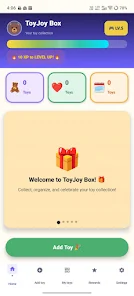
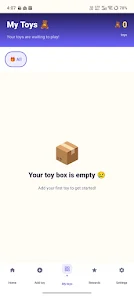
ToyJoy Box – My Toy Collection is a simple, colorful inventory app designed to help families and casual collectors organize, track and enjoy their toy selection using photos and intuitive controls. ToyJoy Box – My Toy Collection focuses on straightforward workflows so you can add items, sort them into meaningful groups and review clear statistics that help with budgeting and decision-making. The interface emphasizes large touch targets, clear visuals and short flows so maintaining an accurate toy inventory feels quick and approachable rather than technical.
Key Features
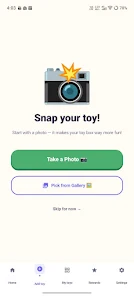
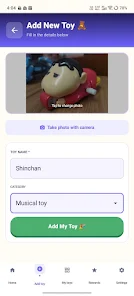
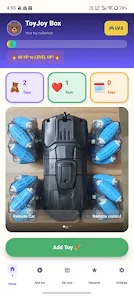
The app makes capturing each toy effortless: add a new entry by taking a photo with the device camera or selecting an image from the gallery; automatic image optimization reduces file size while keeping a useful record of the item. Items can be organized into user-defined categories such as building sets, vehicles, puzzles, action figures and more; category names are editable so the system adapts to your collection rather than forcing rigid labels. Quick collection insights are available at a glance: total items, total spending (shown in local currency) and average price per toy—figures that assist with budgeting and planning purchases. Editing is straightforward: update names, change photos or remove items with clear on-screen controls and confirmation prompts to prevent accidental deletions. All data is stored locally on the device so the app functions fully offline and no account or login is required.
User Experience and Controls
The visual style in ToyJoy Box – My Toy Collection favors bold colors, readable typography and large buttons that make navigation accessible on phones and tablets. Primary controls are placed where thumbs naturally rest, and common tasks such as adding a new toy, switching categories or viewing stats are reachable within two taps. Image handling is integrated into the entry flow: choose or capture a picture, crop or replace it, and the app will apply compacting settings automatically to conserve storage without requiring manual compression. Search and simple filtering let you find items fast by name or category, and the app preserves the original order of entries while offering quick sorting by date added or price to support different review styles.
Progression, Customization and Replay Value
Rather than levels or competitive systems, progression in ToyJoy Box – My Toy Collection is expressed through the growth and refinement of your own inventory. Early use involves an initial setup step where you create a few categories and add core items; over time the collection becomes more detailed as you update photos, correct names and refine categories. Customization options include renaming categories, choosing which numeric fields to track and setting a preferred currency. The app encourages ongoing use because the snapshot of your collection changes with every new addition, purchase or declutter session, making regular checks and edits a low-effort habit rather than a chore.
Practical Workflows and Accessibility
Everyday workflows are intentionally simple: capture an image, pick or create a category, enter a name and optional price, then save. For families or solo collectors this supports tasks like budgeting for upcoming gifts, tracking which items are in rotation and identifying duplicates. Accessibility considerations have been incorporated into the interface design—high-contrast elements, large tappable areas and concise labels—so users of varying ages and abilities can navigate the app comfortably. Because ToyJoy Box operates offline and stores everything locally, it can be used at home, on the go or while shopping without needing network access.
Limitations
ToyJoy Box – My Toy Collection is intentionally focused on simplicity and local use. It does not provide cloud backup or multi-device synchronization; collections remain on the device where they are created. It is not aimed at advanced collectors who require detailed tagging, bulk export options or professional inventory reports. If you need multi-device access or enterprise-style export and reporting, a more feature-rich inventory solution would be a better fit.
Development Team
ToyJoy Box – My Toy Collection was created by a small independent team with a family-centered design approach and practical usability goals. The development focus is on preserving privacy, minimizing setup friction and delivering a lightweight, reliable tool for organizing physical toy collections on a single device.