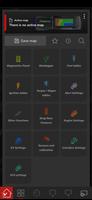
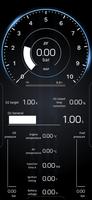
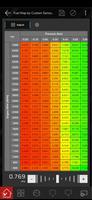
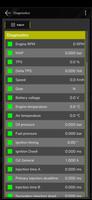
FuelTech Vision is a configuration and analysis application built for engineers and technicians working with the VisionFT line of vehicle control units (VCUs). FuelTech Vision puts direct control of VCU settings and the internal datalogger into a single, cross-platform interface so teams can perform firmware updates, change VCU parameters and inspect recorded data from laptops, tablets and phones. The app combines live receive/transmit capability with centralized access to logs and telemetry streams, helping teams reduce handoffs and accelerate troubleshooting during development and on-track testing.
Key features and capabilities
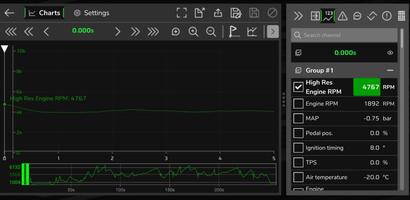
The app provides full access to every configurable VCU function available on VisionFT units, plus tools to update firmware safely and apply configuration changes while monitoring the internal datalogger. For the first time, telemetry streams can be viewed alongside recorded logs, allowing engineers to correlate live sensor information with stored events. Real-time receive/transmit channels support interactive tuning and diagnostics when an active connection to the VCU is present, while collaborative access allows multiple authorized users to connect to the same unit for coordinated changes during test sessions.
Interaction and controls
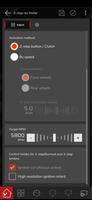
FuelTech Vision presents controls in a practical, engineer-focused layout: parameter trees and numeric controls for precise tuning, graph-based controls for channel scaling and simple touch-friendly toggles for common modes. Controls adapt to screen size so the same workflow works on a tablet or a phone; larger screens expose more simultaneous graphs and parameter groups while compact layouts prioritize the most-used functions. Common operations such as applying a configuration, committing firmware updates and marking log events are reachable in one or two taps, and context-aware prompts reduce the risk of unintended changes.
Workflow, progression and project structure
The app organizes work around projects and sessions rather than game-like levels: create a project for a vehicle or test campaign, then open sessions for specific runs, firmware revisions or hardware setups. Within each session you can save configuration presets, export and import parameter sets, and compare current settings with previous snapshots to understand how changes affected behavior. This structured approach supports iterative progression across testing cycles: baseline setup, targeted changes, validation with telemetry, and refinement based on log analysis.
Data visualization, telemetry and analysis
Visualization focuses on clarity and correlation. Time-synced graphs show recorded datalog channels next to live telemetry streams when a connection is active, and overlays let you mark events, zoom into critical windows and apply filters to reduce noise. The datalog browser supports efficient search, channel selection and statistical summaries so you can quickly locate anomalies. Because telemetry and logs are presented together, diagnosing a fault is a matter of correlating peaks and state changes rather than switching between separate tools.
Customization, presets and repeatability
Customization is intentionally practical: create and store configuration presets for different engines, gearboxes or test conditions, and quickly apply them to a connected VCU. Dashboard layouts are configurable so engineers can prioritize the channels and controls they need at a glance. These features increase repeatability across test runs and across team members, helping ensure that a successful setup can be replicated without reconfiguring low-level parameters every session.
User experience, accessibility and platform support
The interface emphasizes legibility and predictability: adjustable font sizes, contrast-friendly color themes and touch-target sizes suitable for gloved use in pit or workshop environments. Keyboard and mouse input on desktop platforms speed up bulk edits, while touch gestures and simplified menus help when working from a tablet. FuelTech Vision supports a range of operating systems so teams can use the devices they already have and keep the same workflows across different platforms.
Offline use, replayability and diagnostics
Recorded datalogs can be imported and analyzed offline, enabling post-test review when a VCU connection is not available. That offline capability lets engineers replay events, annotate runs and develop hypotheses before returning to the vehicle for further tuning. Built-in filtering, markers and channel comparison tools increase the diagnostic challenge in a constructive way: find the root cause, test adjustments in the next session, and iterate until the system behaves as intended.
Known limitations
The app is tailored to the VisionFT family of VCUs, so compatibility is limited to that product line. Real-time tuning and telemetry depend on an active connection between the VCU and the controlling device, and teams introducing telemetry into established workflows may need a short adaptation period. FuelTech Vision is designed to centralize configuration and analysis, but hardware compatibility and connection methods should be confirmed against your specific VisionFT unit and test setup before critical sessions.