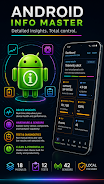
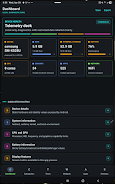
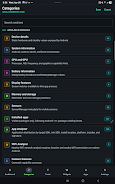
Android Info Master delivers a local-first diagnostic dashboard that shows everything about your Android device in a single, easy-to-scan view. It surfaces hardware and system details — CPU, memory, storage, battery, display, camera, sensors, connectivity and more — and builds detailed reports you control. Power users, technicians and privacy-conscious owners will appreciate fast answers, manual hardware tests, Wi-Fi analysis and exportable reports without accounts, cloud sync or background uploads. Because all data stays on the device and reports are created only on demand, Android Info Master is designed for troubleshooting, device comparisons and secure auditing.
Key Features
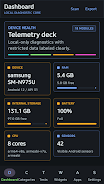
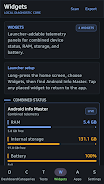
⭐ Comprehensive device dashboard with quick system health metrics and a concise overview of hardware, battery, storage and memory.
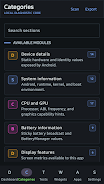
⭐ Deep system inspections covering Android version, CPU, GPU, thermal status, USB, DRM and detailed connectivity data.
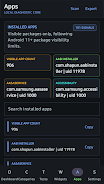
⭐ App Analyzer with filters for platform, installer, target SDK, install location and risk categories to audit installed apps.
⭐ Wi-Fi Analyzer that scans nearby networks, shows signal strength, channels, standards, security and estimated distance.
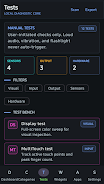
⭐ Manual and live hardware tests for display, multitouch, flashlight, speakers, vibration, sensors, Bluetooth and fingerprint hardware.
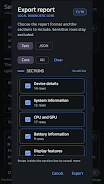
⭐ Android Info Master keeps data local and lets you export selected report sections as text or JSON only when you request them.
Advantages
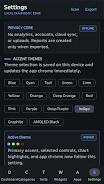
✅ Privacy-first design with no accounts, analytics, background uploads or cloud sync — all information stays on the device.
✅ Fast, practical tools that deliver clear diagnostics and exportable reports useful for repair, troubleshooting and device comparison.
✅ Broad coverage from sensors and camera to DRM and USB details, plus widgets for RAM, storage and battery at a glance.
✅ Custom accent themes and AMOLED-friendly styling make the interface readable and easy to personalize for long diagnostic sessions.
Disadvantages
❎ Several features require Android permissions to access protected areas, such as camera for flashlight tests and location for Wi-Fi scanning.
❎ Some connectivity and phone details are permission-gated and will be restricted or unavailable if permissions are denied.
❎ No cloud sync or automatic backups of reports, so exports must be managed manually if you want off-device copies.