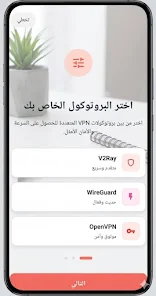
OptimaVPN - Fast & Secure Prox is a lightweight VPN and proxy app designed to make private browsing and unrestricted access simple for everyday use. With a one-tap connection, AES-256 encryption, and an optimized global server network, OptimaVPN - Fast & Secure Prox helps you secure connections on public Wi‑Fi, reduce tracking, and access region-locked content with minimal setup. The app emphasizes a clean, straightforward interface so you can connect quickly and return to streaming, gaming, or working online without diving into complex configurations.
Key Features
The app offers lightning-fast server connections intended to minimize buffering and latency for media streaming and casual gaming. Encryption uses AES-256 to protect data transmitted over both public and private networks. Built-in proxy support and unlimited bandwidth allow extended browsing and downloads without artificial caps. Automatic server selection chooses an optimized route based on latency and load, while the one-tap connect control makes daily use frictionless. A clear privacy policy and a stated no-logs approach focus on limiting retained metadata so the app aims to avoid storing browsing histories, DNS queries, or IP addresses.
How It Works
Connection begins from the main dashboard where a prominent connect button initiates an encrypted tunnel to the nearest available server. The automatic server selection system evaluates route quality to reduce jitter and packet loss, which is particularly useful for streaming and long downloads. While the default path is chosen for speed and reliability, the interface shows the currently selected region and connection status so you can confirm that traffic is routed through the VPN. The app manages re-connections automatically if the underlying network drops and restores, preserving session continuity for most use cases.
Controls and User Experience
Controls are intentionally compact: a single-tap connect/disconnect action, a visible indicator of current protection status, and straightforward settings for account and app behavior. The straightforward design reduces cognitive load for users who just want privacy without configuration, while providing enough transparency for users who want to confirm server location and connection health. Connection indicators and simple status messages help users understand when traffic is protected and when the app is idle. This approach keeps the learning curve short and improves day-to-day usability.
Progression, Customization, and Visual Style
Rather than progression in a gaming sense, progression here refers to tailored use over time: the app remembers your habitual preferences and connection patterns so common actions become faster. Visual style is clean and modern with high-contrast controls and readable status text to aid accessibility. Customization focuses on pragmatic options such as choosing a preferred region, toggling automatic connection on network change, and adjusting basic proxy settings where available. These settings are designed to be useful without overwhelming the user with technical jargon.
Level Structure, Replay Value, and Ongoing Use
Servers are organized by region and type, enabling easy navigation between local, regional, and international endpoints. The practical value of the app increases with regular use: saved preferences, fast reconnections, and consistent throughput support repeated daily activities like media consumption, remote work, and secure browsing. Because the app provides unrestricted bandwidth, users who frequently move between networks will notice the utility every time they reconnect, which contributes to high day-to-day replay value for productivity and entertainment.
Security, Privacy, and Accessibility
Security is grounded in AES-256 encryption and the app’s stated commitment to a strict no-logs policy to minimize retained metadata. OptimaVPN - Fast & Secure Prox aims to prevent third-party tracking and shield credentials when you use insecure hotspots. Accessibility considerations include clear status labels, large tappable controls, and readable color contrasts to help users who rely on straightforward visual cues. The app also attempts to keep essential settings reachable even when connectivity is limited so users can prepare preferences before rejoining a network.
Offline Behavior and Limitations
The app’s management screens and preferences are accessible without an active VPN connection, but actual protection requires an internet connection to establish the tunnel. Some streaming services and websites may continue to block VPN traffic despite the app’s optimizations, and real-world speeds will vary depending on local conditions and server load. Additionally, VPN use may be limited by local regulations in some countries, and users should verify legality and policy compliance for their location.
Practical Tips
For best results, allow the app to select servers automatically for low-latency connections, reconnect if network changes occur, and check permission prompts so the tunnel can be established without interruption. If you experience inconsistent performance, switching to a physically closer server region often improves throughput. OptimaVPN - Fast & Secure Prox is intended for straightforward, everyday privacy and unrestricted browsing while keeping the interface approachable for non-technical users.