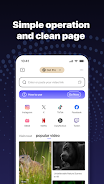
Flex Media Player is a lightweight, dependable media utility designed to play local video and audio files as well as online streams with consistent, high-quality playback. Flex Media Player focuses on simplicity and reliability: it supports common codecs, keeps controls straightforward, and minimizes resource use so devices run cool during long viewing sessions. Whether you arrange a movie night or catch up on clips from the web, the app aims to deliver smooth visuals and clear sound without unnecessary complexity.
Key Features
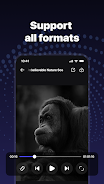
The player supports mainstream audio and video containers such as MP4, MKV, AVI, MOV, WMV, FLAC and MP3, which reduces the need to transcode files before viewing. Its optimized playback engine uses adaptive buffering and efficient decoding to reduce stutter and latency, with hardware-accelerated paths on many modern devices to improve efficiency. Flex Media Player handles both local media and web-based streams so you can switch between downloaded content and online playback without reloading the interface. The app includes basic playback controls like play/pause, precise seeking, playback speed adjustment, and audio track selection, plus support for external subtitle files when available. Background playback is supported on compatible devices so audio continues while you navigate away from the screen.
Controls & Navigation
Controls are intentionally practical and visible: a central play/pause toggle, an easy-to-scrub seek bar, and clear buttons for toggling full screen, subtitles and audio tracks. Common gestures on many devices are supported to speed up routine actions such as quick seeking and adjusting volume or brightness while a video plays. Menus remain uncluttered so you can access recently played items, toggle repeat or shuffle for playlists, and adjust playback speed without digging through nested settings. The interface is responsive on both phones and tablets, with layouts that prioritize large, tappable areas for comfortable use even on smaller screens.
Library, Playlists & Progress
Flex Media Player makes local libraries easy to navigate: it scans device storage to surface video and audio files in a tidy view with folders and media thumbnails. You can build simple playlists to order episodes or music, save favorite items, and resume playback from the last position so interruptions don’t force you to hunt for where you left off. A lightweight watch history helps you find recent files quickly and provides a straightforward way to continue long-form content without losing context. These progression features are deliberately simple and focused on playback continuity rather than complex media management.
Customization & Accessibility
While the player emphasizes a no-frills approach, it includes helpful customization options such as playback speed control, subtitle timing and basic subtitle size adjustments for readability. Users can select audio tracks when multiple streams are bundled with a file and adjust volume normalization where available to create a consistent listening level across content. Accessibility considerations include readable on-screen controls, clear iconography, contrast-friendly color choices, and support for caption files to aid viewers who rely on subtitles or closed captions.
Performance, Offline Use & Compatibility
Designed to be resource efficient, Flex Media Player has a small footprint and low memory overhead so it runs well on older hardware as well as current phones. Offline playback of local files is fully supported, allowing you to enjoy downloaded movies and music without a network connection. When streaming, the player adapts buffering to changing network conditions to reduce stalls and rebuffering. Broad codec compatibility covers most common media, but very rare or proprietary formats may require conversion or a specialized app.
Privacy & Permissions
Flex Media Player follows a privacy-conscious approach: it requests only the permissions necessary to read local storage, access the network for streaming, and interact with media hardware when required. Unnecessary permissions are not requested and many options can be disabled within settings. The app does not collect unrelated personal data for advertising or analytics by default; local playback keeps your media on-device unless you explicitly choose to share or stream content from the web.
Known Limitations
There are a few practical constraints to be aware of. The player requires storage and network permissions to access local files and play online streams, which may concern privacy-sensitive users. It focuses on mainstream formats and may not support some niche or proprietary file types without prior conversion. The app also deliberately avoids advanced editing, cloud syncing or integrated online account features to keep the experience lightweight and predictable.