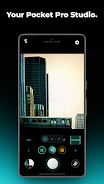
Lumina Cam brings a pocket cinematic studio to your phone with tools for capture, color and finishing in one place. Lumina Cam combines an AI-powered colorist, real-time film filters and a pro-grade editor so you can shoot portraits, night streets or landscapes and complete edits without swapping apps. The first paragraph of the app description highlights that the app supports ultra-high-resolution 4K stills, near-zero shutter lag and an uncluttered interface designed to keep advanced controls accessible to creators and hobbyists alike.
Key features and visual style
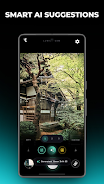
The app includes an AI Colorist that analyzes scenes—portrait, landscape and night—and auto-generates a custom color formula to match the mood, plus a library of cinematic film filters and handcrafted presets such as Film Dust, Light Bloom, Red Halation and Fade. Lumina Cam’s visual style intentionally leans toward classic film aesthetics with subtle grain, halation and bloom effects that are adjustable rather than forced, so you retain control over the final look. The app also offers elegant frame templates that automatically add a tasteful white border with camera model, focal length, aperture and date for archival or social sharing.
Capture mechanics and controls
Capture mechanics are built around a fast, responsive engine that minimizes shutter lag and keeps device temperature low during extended shoots. Manual controls let you set exposure, ISO, shutter speed and focus directly on the viewfinder while touch gestures and on-screen dials provide quick fine-tuning. Real-time film filters preview on the live feed so you can make creative decisions before taking the shot. For users who prefer simplicity, automatic modes combine the AI Colorist and a chosen preset to produce consistent results with minimal input.
Editor workflow and progression
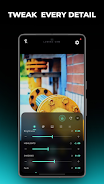
The integrated editor is designed for an end-to-end mobile workflow so you can move from capture to finished image without exporting between apps. Editing operates in stages: base correction, creative tone application, and fine adjustments. The glassmorphism editor presents more than 35 pro-level controls including skin tone protection, foliage shift, split toning and custom HSL curves. As you work, you can save intermediate versions and build a personal progression of adjustments—useful for iterating on a look or preparing a series of images with consistent color grading.
Customization, presets and sharing
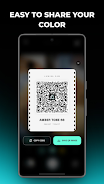
Customization centers on presets and community sharing. You can save your own formulas as reusable presets, and Lumina Cam supports Film Ticket QR presets to export, share and import community color formulas instantly. A cloud backup option keeps your custom presets safe and allows restoration to a new device, while local storage ensures that you can work offline without losing access to previously saved looks. The one-time Lumina Pro upgrade unlocks all premium filters, removes ads and enables unlimited preset saves plus AI generation for those who want the full set of creative tools.
User experience, accessibility and offline use
The interface favors clarity: controls are grouped by task, with contextual labels and subtle tooltips that help shorten the learning curve for more advanced features. Accessibility considerations include adjustable text sizes for menus and high-contrast overlays for the viewfinder to assist users in challenging lighting. Offline playability is built in—capture and editing work without a network connection, and cloud features remain optional. The app balances depth and approachability so both newcomers and experienced photographers can tailor their experience over time.
Replay value, challenges and expected trade-offs
Replay value comes from experimenting with different presets, revisiting older shots to apply new color formulas, and refining a personal library of looks for consistent series work. There is a modest learning curve for users who want to take full advantage of the editor’s extensive controls, and some key capabilities require the Lumina Pro purchase to unlock. Importing shared presets relies on scanning Film Ticket QR codes provided by other users, which is practical for community exchange but means look sharing is tied to that system rather than an automatic online marketplace.
What to know before installing
Lumina Cam is designed for photographers and creators who want cinematic results and streamlined mobile workflows. Expect robust color tools, high-resolution capture and a suite of pro features packaged in a single app. Consider the one-time Pro upgrade if you plan to rely heavily on premium filters and unlimited preset storage. Privacy and local control are supported by offline editing and optional cloud backup, and the documentation within the app covers basic techniques to help you get productive quickly.