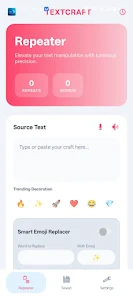
Text Repeater Tool makes it fast and simple to duplicate and stylize text for messaging, social posts, creative projects, or development testing. This utility generates repeated strings, applies Unicode font styles, performs case and character transformations, and produces invisible zero-width text, all from a clean, Material Design–inspired interface. Users will appreciate hands-free input with built-in Speech-to-Text and audible previews via Text-to-Speech, plus configurable repeat counts, dividers, and live statistics to monitor output size. Whether you need template messages, decorative fonts for profiles, or bulk test data, Text Repeater Tool centralizes those tasks on-device with privacy in mind.
Key Features
⭐ Text Repeater Engine: Text Repeater Tool can generate between 1 and 1,000 repetitions of any string, with numeric input or a synced slider and options for custom dividers or line breaks.
⭐ Voice Integration: Built-in Speech-to-Text for hands-free entry and Text-to-Speech to listen to generated output.
⭐ Smart Emoji Replacer: Automatically swap specific words for chosen icons using an intelligent replacement system.
⭐ Unicode Font Styling & Transformations: Apply Bold, Italic, and Script Unicode styles and modify text with Uppercase, Lowercase, Capitalize, Reverse, or ZiGzAg modes compatible with major messaging and social platforms.
⭐ Invisible Text Generator: Create zero-width Unicode spaces to produce blank or invisible messages for specialized uses.
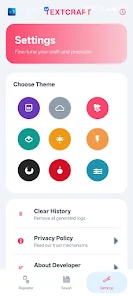
⭐ Design and Live Stats: Choose from nine professional themes (including Midnight, Ocean, Sunset, Berry) and track repeat counts, word and character counts, and total lines in a glass-styled dashboard.
Advantages
✅ On-device privacy: All text processing happens locally and the app does not collect personally identifiable information.
✅ Fast and flexible controls: Adjust counts, use templates, add dividers, and apply styles quickly with sliders and numeric input.
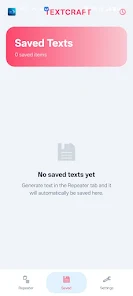
✅ Helpful history and templates: Automated history saves your last 50 generations and message templates speed up common scenarios.
✅ Modern, polished UI: Material Design 3-inspired interface with smooth transitions and multiple color themes for a professional look.
✅ Quick actions: Copy to clipboard, clear fields, or share output directly to other installed apps with dedicated buttons.
Disadvantages
❎ May display ads: The app requires minimal network permission that is used for advertisement delivery.
❎ History limit: Automated history stores only the most recent 50 generations, which could be restrictive for heavy users.
❎ Repetition cap: Individual generations are limited to a maximum of 1,000 repeats.