MyIPNow is a compact network toolkit for Android that brings nine essential utilities into a single app for IT professionals, network engineers and curious users who want to inspect and troubleshoot their connection. MyIPNow bundles IP and domain intelligence, diagnostic tests and practical network utilities in a lightweight package that runs largely on-device; the interface is focused on immediate results and clear, technical output for both quick checks and deeper analysis. This introduction explains what each module does, how controls and modes work, and what to expect in terms of privacy, offline capability and limitations.
Key features and what they show
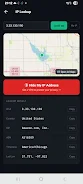
IP lookup in MyIPNow reveals public IPv4 and IPv6 addresses, associated ISP and ASN information, timezone and full geolocation details including latitude and longitude. The lookup accepts both raw IPs and hostnames so you can inspect any endpoint, compare addresses seen from your device versus external views, and use geolocation output to verify routing or hosting locations. Results include human-readable fields and an option to view raw JSON for developers and auditors who need exact API responses.
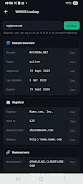
DNS and WHOIS utilities provide layered visibility into a domain or IP. The DNS tool queries common record types — A, AAAA, MX, TXT, NS, CNAME, SOA and PTR — and shows TTL and authoritative information where available, which helps diagnose propagation and configuration problems. The WHOIS lookup returns registrar and registration details where supported, including nameservers and expiry dates; coverage depends on TLD support but the app surfaces the full response when available so you can confirm ownership and registration timelines.
Blacklist and reputation checks scan an IP against a wide selection of major blocklist databases and return a summarized clean/listed count with direct access to entries that report a problem. This makes it straightforward to determine whether mail delivery or access issues are caused by reputation problems. The app explains the meaning of a listed result and points out when multiple listings suggest broader reputation issues versus a single, possibly transient report.
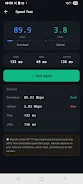
Network test tools include a configurable ping utility and a live speed test. The ping tester reports latency (min/avg/max), packet loss and basic timing statistics; you can test custom hosts or use common provider endpoints. The speed test measures download and upload throughput plus ping, jitter and a simple quality indicator so you can compare performance across networks. Both tests are designed to be repeatable and show clear timings and numerical outputs suitable for troubleshooting.
Additional utilities cover ASN lookup, a subnet calculator (simple and advanced modes with binary breakdown and allocation tables) and a configurable password generator. The subnet calculator helps with CIDR sizing, usable address counts and network/broadcast calculation while the password tool lets you set length and character sets for strong credential generation. These tools are aimed at daily administrative tasks and educational exploration of addressing and routing concepts.
Controls, modes and user experience
MyIPNow offers two primary workflows: quick mode for one-tap results and advanced mode for detailed parameter control. Quick mode streamlines common checks such as ‘‘what is my IP’’ or a standard speed test, while advanced mode exposes options like record type selection for DNS queries, packet size and count for ping tests, and subnet bit-length fields in the calculator. Inputs accept typed hostnames, pasted IP addresses and optional labels to keep results understandable. Output is presented in concise panels where fields are selectable so you can copy values into other tools or documentation.
Design, accessibility and offline behavior
The app favors a clear, technical presentation with readable tables, labeled fields and raw JSON view for anyone who needs exact data. It respects system accessibility settings for font sizes and works with common screen readers by using descriptive labels for controls and results. Performance is optimized so local tools such as the subnet calculator and ping run without network dependency; other services that require external information will indicate when a network connection is necessary.
Privacy, data handling and limitations
Privacy is central to the design: no account is required and there is no persistent storage of personal results by default. Most diagnostic functions run on-device, but certain lookups such as geolocation resolution, DNS aggregator queries and WHOIS records rely on external public APIs or the app’s servers for authoritative responses. That means availability and the level of detail returned depend on those services. WHOIS coverage is broad but limited to supported TLDs and IP ranges; the app reports when a query cannot be completed due to external constraints.
Who benefits and how this helps learning
MyIPNow is useful for system administrators who need quick diagnostics, network engineers who require detailed breakdowns for troubleshooting, and students or hobbyists learning how IP addressing, DNS and routing behave in the real world. The combination of quick summaries and advanced, explainable outputs makes it a practical study aid: you can run a test, inspect raw JSON, and then adjust parameters to see how results change. Repeating tests with varied settings highlights transient issues and teaches the relationship between configuration and observable network behavior.