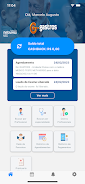
Gastros is a patient-focused scheduling app that makes arranging medical appointments and diagnostic exams more straightforward and reliable. Gastros places a clear, calendar-driven interface at the center of the booking experience so patients can find available times, confirm visits, and keep upcoming appointments organized without relying solely on phone calls or reception queues. The description below explains how the app is structured, how interactions work, and what patients can expect when they use Gastros to manage routine healthcare visits.
Key Features
The core of the app is a streamlined scheduling tool designed to reduce friction at every step of the booking process. Users can browse available appointment slots presented in a familiar calendar or list view, select a preferred time, and complete the booking in a few taps. The interface consolidates consultations and diagnostic exams so that different visit types are visible together, helping users plan around work and personal commitments. Gastros also offers a centralized appointment list where past, confirmed, and tentative bookings are grouped to make follow-up and rescheduling easier.
How Booking and Controls Work
Interaction mechanics are deliberately simple: tap to view provider details, swipe to move between dates, and use intuitive on-screen controls to confirm or modify a booking. The flow is divided into clear stages to guide users from search to confirmation: choose service type, pick a clinic or provider when available, select a time slot, and review appointment details before finalizing. Progress indicators and short contextual prompts help users understand where they are in the process, and undo or edit options are available so scheduling feels forgiving rather than final on the first try.
Progression, Records, and Repeat Use
Progression in the app refers to the way users build a personal schedule and medical history of appointments. Each confirmed booking is added to a chronological record that makes it easy to review past visits and repeat frequent appointments with fewer steps. Favorite providers or preferred clinics can be marked for quicker access, and templated bookings for routine exams allow returning users to progress through scheduling in less time. This repetition and the ability to reuse past information improve efficiency and increase the app's long-term usefulness for regular patients.
Visual Style and Customization
The visual design prioritizes clarity: high-contrast text, spacious calendar blocks, and legible icons that reduce cognitive load during booking. Users can switch between compact and expanded calendar layouts to suit their device size and viewing preference. Basic customization options let users set default visit types, preferred scheduling windows, and notification preferences so the app matches individual routines while maintaining a consistent visual language across screens.
Accessibility and Offline Considerations
Accessibility is addressed through large touch targets, clear labels, and straightforward navigation to support users with varying dexterity and vision needs. Voiceover compatibility and adjustable font sizing are considered design goals to make the scheduling flow accessible. When connectivity is limited, the app preserves recently viewed appointments and draft bookings so users can continue planning; final confirmation of a new booking requires a network connection and participating provider availability, which is a practical limitation of any scheduling platform.
Managing Conflicts and Limitations
Gastros helps users handle common scheduling challenges such as overlapping appointments and limited provider availability by flagging potential conflicts during the booking process. If a desired clinic does not participate directly through the app, users will still see contact details and next steps so they can complete arrangements offline. The app depends on provider participation, so coverage and feature availability can vary by region and by clinic; this is an expected limitation and is communicated within the booking screens to set realistic expectations.
Security, Privacy, and User Experience
Patient convenience is balanced with privacy considerations by keeping appointment data organized and exportable for personal records while avoiding unnecessary exposure of sensitive details. The user experience focuses on predictable flows, confirmation screens that summarize key details, and easy access to support or clinic contacts if questions arise. For patients who want a cleaner, faster way to schedule routine visits, Gastros is positioned as a practical tool to reduce administrative friction and make interactions with healthcare providers more orderly and transparent.