Fuel Consumption is a lightweight utility designed to help vehicle owners track fuel usage, costs and efficiency with minimal fuss. From the first full tank to each subsequent refill the app uses the proven full-to-full method: reset the trip odometer on a full tank, then record kilometers driven and liters filled at the next complete refill along with per-liter or total cost. Fuel Consumption then calculates average consumption and running expenses so you can watch trends over weeks, months or years and make informed decisions about maintenance, driving habits and budgeting.
Key features
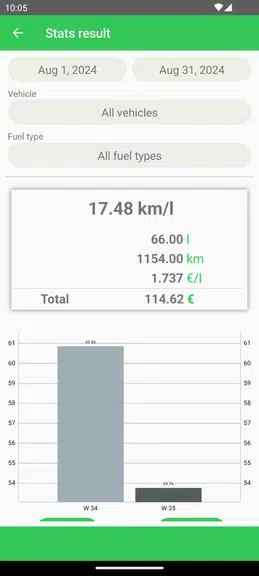
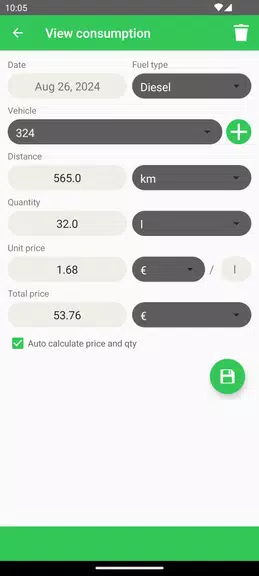
The core of Fuel Consumption is a simple, repeatable workflow that keeps data entry focused and fast. Open the vehicle record, enter the odometer reading, the liters added and either the per-liter price or the total amount paid, and the app will compute the consumption for that segment plus cumulative averages. A dedicated statistics view summarizes average consumption, total expense, distance covered and cost per distance for any date range you choose, helping you spot changes in efficiency after servicing or during seasonal driving.
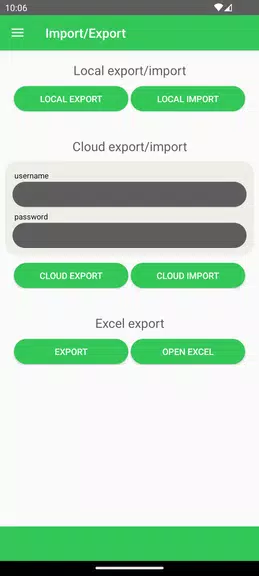
Fuel type support is broad: you can track petrol, diesel, electricity, LPG, methane and other fuels all within the same account, and maintain separate profiles for cars, motorbikes or any other vehicle. This multi-vehicle support makes comparisons straightforward and keeps logs for each vehicle distinct while using the same interface. Data is stored locally by default so the app functions offline; an optional cloud sync lets you keep a secure backup and access your records from another device.
Controls and workflow
Controls are deliberately minimal to reduce input time and errors. The app interface focuses on three essential fields per refill: odometer, volume and cost. You can switch between per-litre and total-cost entry on the fly and the calculation adapts automatically. Navigation follows a linear flow from vehicle selection to new entry to statistics, so even new users can begin accurate tracking after a single completed refuel. Touch targets are sized for one-handed use and the form enforces numeric validation for odometer and volume fields to prevent common entry mistakes.
Progression and long-term tracking
Rather than gamified progression, Fuel Consumption offers progression in the form of increasingly valuable data. As you accumulate entries the statistics page reveals more reliable averages and long-term trends that support better decision making. Short-term fluctuations are shown alongside rolling averages so you can distinguish a one-time anomaly from a sustained change. Exporting your entire history to an Excel file allows further analysis, charting or sharing with a mechanic or fleet manager, which is especially useful for users who need formal expense records.
Visual style and user experience
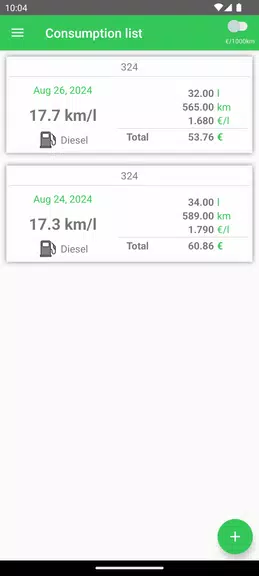
The visual design emphasizes legibility and clarity: a clean dashboard, clear numeric fields and a statistics layout that highlights the most relevant metrics first. Color and typography are used conservatively to draw attention to key numbers without overwhelming the screen. This restrained visual approach contributes to rapid scanning of past entries and quick comprehension of trends when reviewing the statistics page.
Customization and accessibility
Fuel Consumption lets you name vehicles, select fuel types and choose preferred units for distance and volume so the app fits regional preferences. Accessibility considerations include adjustable font sizes, high-contrast display options and form layouts optimized for screen readers and simpler navigation. These settings help ensure the app remains usable for drivers with varying needs and in different lighting conditions.
Offline operation and data safety
Because entries are stored locally, Fuel Consumption works reliably without a network connection — a practical choice for rural or underground refueling locations. When you opt into cloud backup the app securely synchronizes records to protect against device loss or to transfer data to a replacement phone. Export to Excel provides an additional portable copy you can keep for tax, reimbursement or archival purposes.
Limitations and best practices
To achieve accurate consumption readings Fuel Consumption relies on the full-to-full method: partial refuels will reduce measurement precision. Regular, consistent entry of odometer and volume values is recommended for the most reliable averages. The app does not automate odometer capture from vehicle systems, so accurate manual input remains important. For fleet or heavy-use scenarios, frequent exports and backups are advisable to maintain a primary record outside the device.