Local Ai LLM is a privacy-first, on-device AI assistant built to run entirely on your Android phone without routing personal data to cloud servers. Local Ai LLM brings modern Gemma 4 variants to the device so you can generate text, analyze documents and images, and operate phone functions using voice or typed commands even when offline. The app is designed for anyone who needs a responsive AI companion for sensitive tasks, travel in low-connectivity areas, or for users who simply prefer keeping all data local and under their control.
Key features and interaction model
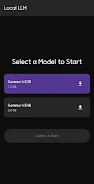
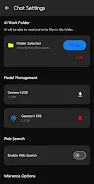
The main interaction method is a straightforward chat interface that supports both typed prompts and voice input, allowing quick follow-up questions and multi-turn conversations. Local Ai LLM supports on-device Gemma 4 models (E2B and E4B) and can take advantage of GPU or NPU acceleration where available to speed up local inference. Users can upload PDFs, DOCX, XLSX files and images for summarization or targeted analysis, and the app can perform local file read and write operations within a user-assigned work folder so documents can be created, edited, and organized without leaving the device. An optional real-time web search can be enabled to refresh answers when internet access is available, but by default all operations and histories remain local.
Controls and ease of use
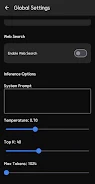
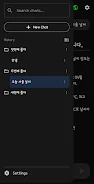
Controls are intentionally simple: chat text entry, a single voice-record button, and clear access to attachments and folder browsing. Advanced settings are tucked into an accessible configuration area where you can adjust the system prompt, temperature, top-k sampling and token limits to shape model behavior. For users who prefer quick access, the app exposes basic shortcuts and contextual actions directly from conversation threads, and persistent conversation pins and folder organization make it fast to return to ongoing projects. The interface design focuses on clarity, with readable message bubbles, timestamps, and a compact file browser for managing model files and documents.
Progression and customization
Progression within Local Ai LLM is centered on model selection, storage management, and prompt refinement rather than game-style levels. As you use the app you will typically progress from a small, faster model to larger variants as your needs evolve, and the app provides tools to manage downloads, remove older models, and monitor storage use. Customization options include saving system prompts and chat templates, creating folder-based projects to keep research or work conversations organized, and tuning generation parameters to develop a consistent voice and output style. These features help users gradually build a personal workflow that improves results over time.
Visual style and workspace structure
The visual style is clean and utilitarian to support productivity: a neutral color palette, comfortable typography, and compact controls that minimize distraction. Conversation threads function like workspaces, and folder organization provides a simple level structure for separating tasks, projects, or subject areas. Each folder can contain multiple chats, uploaded documents, and image analyses, so you can treat folders as discrete project stages or research modules. Search and sorting tools help you locate past conversations and files quickly.
Replay value and long-term use
Local Ai LLM offers sustained usefulness rather than fleeting novelty. Replay value comes from saving prompt templates, iterating on system settings, and building a library of curated documents and model snapshots. Regular model updates and the ability to switch between performance and quality-oriented models keep the experience fresh. Because the app runs locally, repeat interactions are fast and private, encouraging repeated use for drafting, note-taking, summarization, coding assistance, and on-device research tasks.
Accessibility and offline play
The app is built to remain functional offline: once models are downloaded, all core features operate without internet access, which is ideal for travel, secure locations, or poor networks. Accessibility considerations include voice input for users who prefer spoken interaction and adjustable text sizing for readability. The modular design means you can choose smaller models for lower-powered devices or larger models for richer outputs if your device supports hardware acceleration.
Limitations and device impact
There are trade-offs to running large models on-device. Initial model downloads are sizable, typically between 1.5GB and 3.2GB, so a stable Wi‑Fi connection is recommended for setup. On-device inference can consume significant CPU, GPU or NPU resources and may increase battery use or slow other apps on older hardware. Offline knowledge is bounded by the downloaded models unless optional web search is enabled. The app includes clear warnings and storage tools to help you manage these constraints and select models that match your device capability.
Security and privacy
Local Ai LLM prioritizes keeping conversations, files, and history on your device to reduce exposure of sensitive information. Storage and file permissions are transparent and isolated to the app's workspace, and optional features that require internet access are off by default. For users who value privacy and local control, this app is designed to minimize external data flows while still offering configurable AI functionality and practical productivity tools.