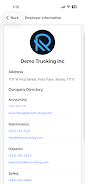
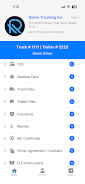
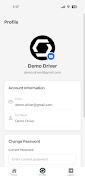
Digital Truck Binder is a practical document management app built to keep driver records and company paperwork organized and accessible on the device. Digital Truck Binder offers a single, structured place to collect licensing, certifications, vehicle documents and routine paperwork so drivers and fleet managers can find what they need quickly without flipping through paper binders. The opening screens emphasize simplicity: clearly labeled driver profiles and vehicle folders let users drill down to the exact file they need while on the road.
Key features and expected workflow
The app focuses on core document tasks rather than fleet telematics: add and tag files to a driver or vehicle profile, view PDFs and images, and keep related paperwork grouped together for consistent record keeping. Typical workflow begins by creating driver or vehicle entries, importing existing PDFs or photographs of documents, and assigning each file to the appropriate record. Built-in search and basic filters make retrieval straightforward so routine checks and audits take less time.
Controls and user interactions
Controls are designed to be touch-friendly and familiar to Android users: tap to open a profile, swipe or tap to preview a file, and use simple on-screen buttons to upload or rename documents. Uploading supports importing from the device file manager and from the camera to capture a paper record quickly. Long-press options and clear icons aid quick editing and reassigning of files without navigating complex menus, keeping the learning curve very shallow for drivers and dispatch staff.
Progression, setup and time-to-value
Getting value from Digital Truck Binder is primarily an organizational progression rather than a game-like leveling system: initial setup requires cataloging current driver and vehicle documents, which is the main one-time effort. As records are added, the system becomes more useful; routine onboarding of new documents and simple maintenance deliver continuous time savings. Administrators will typically see reduced time spent searching for paperwork after the first few weeks of consistent use.
Organization structure and visual style
The app organizes content around two clear axes: drivers and vehicles. Each entry acts like a mini-binder where documents are grouped by type and date so a single profile contains licenses, inspections, and any other relevant files. The visual style favors high-contrast lists and readable typography with clear headings for each document type, which helps when viewing on smaller screens or in a vehicle cab under variable lighting. Icons and color accents are used sparingly to convey status and keep the interface focused on content.
Customization and templates
Digital Truck Binder supports basic customization to fit company workflows: customizable labels or document categories let managers align the app with existing filing conventions, and users can rename or reclassify documents to match internal processes. Simple templates for common file groups speed up adding recurring paperwork such as DOT inspections or monthly checklists, reducing repetitive setup and improving consistency across a fleet.
Replay value and ongoing use
The app’s replay value comes from daily operational benefit rather than entertainment. Drivers and managers will open it repeatedly to check credentials, attach new paperwork, or prepare for inspections. Because the app reduces the friction of locating documents, it naturally becomes part of routine pre-trip checks and compliance workflows, encouraging regular use and continual improvement of record hygiene.
Accessibility, offline access and performance
Designed for practical field use, the app keeps interactions simple and performs well on a range of Android devices. Offline access to locally stored documents is emphasized so users can retrieve files without relying on a constant data connection. Text labels, readable fonts, and clear contrast options help with accessibility, and the streamlined interface means fewer taps for users who need fast, dependable access during short stops or roadside checks.
Limitations and real-world considerations
Digital Truck Binder is purpose-built for document storage and organization rather than full fleet tracking, route management, or telematics. Teams should expect an initial investment of time to digitize existing paper records for the most benefit, and administrators should plan a simple onboarding routine to keep files consistent. For organizations seeking a focused, no-frills solution to centralize paperwork and reduce reliance on physical binders, Digital Truck Binder provides a clear, usable tool that integrates into daily fleet operations without unnecessary complexity.