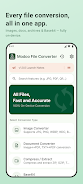
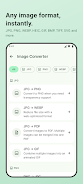
Modoo File Converter is an all-in-one, on-device file conversion tool that handles images, documents, archives and Base64 without sending your data to external servers. It converts common photo formats (JPG, PNG, WEBP, HEIC, GIF, TIFF, SVG), turns images into PDF, converts Office files and extracts or creates ZIP/7Z archives — all while working offline for privacy. If you need to convert iPhone HEIC photos, merge many images into a single PDF, or avoid uploading sensitive files, Modoo File Converter keeps everything local and saves results to the Downloads/ModooFileConverter folder on your device.
Key Features
⭐ Image format conversion between JPG, PNG, WEBP, HEIC (Android 10+), BMP, GIF, TIFF and SVG, with adjustable output quality and image→PDF merging.
⭐ Document conversions including PDF↔TXT/JPG/PNG, DOCX→PDF/TXT, XLSX→CSV/TXT, PPTX→PDF/JPG/PNG, HTML↔PDF/TXT and Markdown→PDF/HTML.
⭐ Compression and extraction for ZIP, 7Z, TAR, TAR.GZ and GZIP with support for multi-file compression and high-ratio 7Z archives.
⭐ Real-time Base64 encoding and decoding for text with instant feedback as you type.
⭐ Batch conversion, conversion history for quick access, dark mode and bilingual support to streamline workflows in Modoo File Converter.
Advantages
✅ Fully on-device processing means files never leave your phone, enhancing privacy for sensitive documents and photos.
✅ Works offline with no internet connection required, so conversions are available anywhere.
✅ Batch processing, conversion history and adjustable quality make it practical for bulk or repeated tasks.
✅ Dark mode, Korean and English interfaces, and a one-time purchase option to remove ads improve usability and long-term value.
Disadvantages
❎ HEIC conversion requires Android 10 or later, so older devices may not support iPhone HEIC files directly.
❎ The app includes ads in the free version; removing them requires a one-time purchase.
❎ Language options are currently limited to Korean and English, which may be restrictive for some users.