Futemax Futebol Ao Vivo is a lightweight media player built to play and manage M3U and Xtream Codes (XC) playlists with speed and stability, offering a clean interface and straightforward controls for users who bring their own streams. The app is designed for people who already use IPTV playlists and need a reliable local player to browse channels, organize categories, and switch streams without unnecessary complexity. It does not supply or host any streaming content; users add playlists they legally own or have permission to access and remain responsible for the sources they use.
Key Features
The core strengths of Futemax Futebol Ao Vivo include broad support for common playlist formats, a modern and intuitive user interface, and emphasis on stable playback. The player parses M3U files and Xtream Codes entries, displays channel and category names, and lets users quickly jump between lines of content. Playback is optimized to reduce buffering where network conditions permit, and the app keeps UI interactions responsive even when managing long playlists.
Controls and Navigation
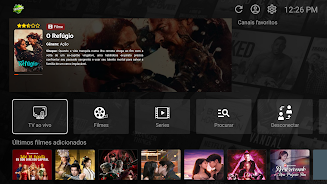
Navigation in the app is deliberately simple: users move through channels and categories with a familiar list-based layout, and playback controls include play, pause, stop, and seek where supported by the stream. The remote-friendly design supports touch devices and external controllers in the same consistent layout, so people who use set-top boxes or Android TV can operate the player without a steep learning curve. Playlist import and removal are handled from a single management screen to minimize steps when updating content.
Organization and Progression
Futemax Futebol Ao Vivo helps users create a clear progression through their content by allowing custom channel grouping and local lists. Users can create folders or labeled playlists to mirror the way they watch content, for example grouping channels by sport, region, or language. Favorites and recently played lists let users return quickly to preferred channels and the app maintains a simple history to make resuming viewing straightforward. These features are helpful for routine navigation and for building a personal channel lineup over time.
Customization and Visual Style
The visual design focuses on clarity and minimal distraction so channel names and categories remain prominent. Users can adjust basic presentation options, such as list density and sorting preferences, to suit personal taste and screen size. Icons and thumbnails are supported when available in the playlist metadata, but the emphasis is on readable text and stable layout so the experience remains usable across small phones, large tablets, and TVs.
Playback Experience and Reliability
Playback aims to be smooth and predictable; the player prioritizes stability over experimental features and is tuned to handle large playlists without excessive memory use. Buffering behavior follows standard Android media patterns and the app avoids preloading more content than necessary to keep resource use low. Clear on-screen feedback indicates loading, buffering, and stream errors so users can troubleshoot connections or replace broken playlist entries themselves.
Accessibility and Local Use
Accessibility considerations include readable fonts, clear contrast, and straightforward navigation paths. The app is designed to be usable without online service accounts because all playlists are managed locally; this reduces permission requirements and keeps control of content in the hands of the user. Local storage for playlists and simple backup/export options let users move their configurations between devices without relying on cloud services.
Limitations and Responsibility
Futemax Futebol Ao Vivo does not provide any built-in electronic program guide (EPG) integrations, cloud-hosted streams, or online ranking systems. Support is focused on M3U and Xtream Codes formats and other playlist types may not be supported. Because the app does not host content, users must ensure that the playlists they add comply with copyright and local regulations; the developer does not take responsibility for third-party streams.
Tips and Best Practices
For best results, test playlists on the same network where you will watch to confirm stream reliability, organize channels into named folders for quick access, and use the favorites and history features to speed up daily viewing. If you encounter issues, replacing a single problematic entry in a playlist is often faster than reloading the entire file. For users who manage many channels, keeping playlists segmented by category reduces load time and simplifies navigation when browsing live content with Futemax Futebol Ao Vivo.