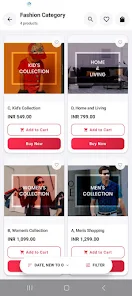
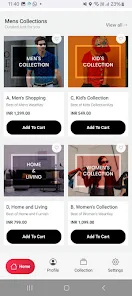
Appokart is a mobile preview tool built for merchants, developers, and designers that shows exactly how an online store will look and behave on a real smartphone before customers see it. Appokart connects to your store account and renders a live, device-accurate preview so you can verify themes, layouts and individual product pages on screens that match common phone sizes and orientations. That immediate visual feedback helps you catch spacing problems, missing images, or navigation quirks early in the design cycle and makes it faster to move from a desktop mockup to a tested mobile experience.
Key features and what they mean
The app provides a lightweight, secure preview that mirrors a storefront’s appearance and interaction on small screens. Rather than a static screenshot, Appokart reflects real-time edits from your store so updates to text, images or layout are visible instantly in the mobile preview. You can switch themes or layout variants in the preview to compare visual options before pushing them live, and the rendering focuses on common mobile breakpoints so you can evaluate how content reflows on narrow viewports and in both portrait and landscape modes. A private connection to your account ensures data used for the preview remains protected while delivering an accurate live representation of the storefront.
How Appokart fits into your workflow
Using Appokart typically follows a few straightforward steps: connect the store account, choose the theme or page to test, and interact with the preview as if you were using a customer’s phone. Controls in the preview replicate basic touch behaviors so you can tap through menus, open product galleries, test checkout navigation and observe scrolling performance. This makes Appokart useful both for one-off design checks and for routine QA passes where each change needs verification on a mobile form factor before publishing.
Design testing, customization and validation
Appokart emphasizes visual validation and small interaction checks rather than replacing full desktop testing tools. The preview highlights common mobile issues such as overlapping elements, insufficient spacing, broken image links and overly long text wrapping. Designers and developers can evaluate typography scale, button sizes and navigation structure directly on a phone-sized canvas and iterate quickly by swapping themes or updating templates in the connected store. Because the preview refreshes in real time, small fixes can be confirmed immediately without repeatedly loading physical devices or building new test artifacts.
Progression, reuse and replay value
Rather than a one-time inspection, Appokart promotes a progression of iterative testing: initial layout checks, responsive adjustments, content edits and final verification prior to publishing. Teams can reuse the same preview sessions for regression checks after deployment or when rolling back to prior theme states, and the streamlined feedback loop reduces the friction of repeated mobile QA. That replay value makes Appokart a practical addition to release checklists, design reviews and cross-device spot checks during feature sprints.
User experience and accessibility considerations
Appokart helps teams evaluate the end-user experience by surfacing how interactive patterns work on touch devices and by making it easier to judge readability and tap target sizing. While the tool does not generate automated accessibility reports, it gives designers a quick way to test contrast, font legibility at typical reading distances, and whether interactive elements meet recommended touch dimensions. Because the preview runs in a secure, responsive environment, it is straightforward to validate usability for customers who primarily use smartphones to browse and shop.
Limitations and offline note
There are a few practical limitations to keep in mind. Appokart requires a connection to your store account for live previews, which means an initial setup step is necessary and the previews rely on an active internet connection so offline testing is not supported. The tool focuses on mobile preview accuracy and interaction checks and should be used alongside broader desktop testing and analytics platforms when you need deep performance profiling or long-term traffic measurement.
Who benefits most from Appokart
Merchants preparing theme updates, designers polishing mobile layouts and developers validating responsive behavior will find Appokart particularly useful. The app speeds up decisions around themes, product page layouts and navigation flow by putting a realistic mobile viewport in front of the team without constant device switching. By integrating Appokart into routine QA and review processes, teams can reduce last-minute mobile surprises and publish storefront changes with greater confidence.