Cleaner Mate is a lightweight Android utility designed to help you reclaim storage, reduce clutter and keep your device running smoothly. Cleaner Mate scans for junk files, analyzes large files that are taking up space and offers a one-tap workflow to remove unnecessary items. The app focuses on straightforward file cleanup and photo compression without overwhelming settings, making it a practical choice for users who want clear, fast results.
Key features
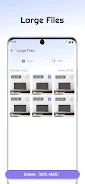
The app performs an intelligent scan that separates cache, temporary files, installation leftovers and other junk categories so you can see what is safe to remove and what should be reviewed. A large-file scanner lists items by size and file type, letting you preview videos, downloads and archives before choosing to delete them. Photo compression preserves visual clarity while reducing file sizes through adjustable quality levels, and all operations are performed on the device so your data does not need to be uploaded to a server.
How the cleaning workflow works
Cleaner Mate guides you through a simple three-step cleanup flow: scan, review and clean. The scan phase quickly indexes storage and produces a prioritized list of items that are likely to free the most space. During review, thumbnails and file details are shown so you can exclude specific items. The clean step executes removals and reports how much storage was reclaimed. The controls are touch-first: taps select items, a single confirmation completes deletion and an undo option is available immediately after each operation to reduce the risk of accidental removals.
Photo compression and image handling
Photo compression is implemented with an emphasis on preserving visual quality for everyday photos while reducing storage cost. You can choose a preset quality level that balances filesize and clarity, or use a manual slider for finer control. Compression runs locally and supports batch processing so you can compress entire albums without individually editing pictures. Preview images show estimated before-and-after sizes so decisions are transparent and reversible until you confirm changes.
Battery and device information panel
Cleaner Mate includes a battery information panel that summarizes recent usage, lists apps that have consumed significant power over a period and highlights potential drains. The panel is intended for monitoring rather than aggressive power management: it points out high-usage apps and offers suggestions, such as closing background apps or adjusting display settings, so you can make informed decisions. All diagnostics are presented in plain language with easy-to-read charts and timestamps.
Built-in device manager tools
The device manager section lets you inspect storage by folder and file type, check app sizes and explore media collections. Tools for locating duplicate files and identifying rarely used apps help you plan deeper cleanups. These utilities are designed to be complementary to the core cleanup features rather than replacing system-level management; Cleaner Mate does not modify system files or request unnecessary privileges, and it provides clear explanations of the permissions it needs to scan and remove user files.
User experience, accessibility and offline use
The user interface favors clear typography, accessible contrast and large touch targets to support one-handed operation and users with varying dexterity. Cleaner Mate is optimized for modest memory use and performs scans and compression offline so it works without an internet connection. Language and layout are kept simple, and frequently used actions are within easy reach to minimize taps. Accessibility settings respect device font size and screen readers, and the app avoids cluttered dialogs to keep interactions straightforward.
Progression, customization and replay value
Rather than game-like progression, Cleaner Mate offers incremental benefit over time: regularly running scans helps you understand storage trends and keeps your device responsive. Customization options include choosing compression presets, selecting file categories to exclude from scans and setting a default review behavior for large files. Because the app is safe to run frequently, routine maintenance becomes predictable and repeatable, which increases the long-term value of the tool.
Advantages and limitations
Cleaner Mate reclaims space efficiently and offers transparent controls for photo compression and file removal, with easy-to-read battery insights and file management tools. At the same time, it focuses on cleanup and file-level management rather than full system optimization suites or backup/recovery services, so users who need advanced recovery or cloud sync will want to pair it with specialized apps. The intention is to keep the experience fast, privacy-respecting and focused on everyday storage tasks.