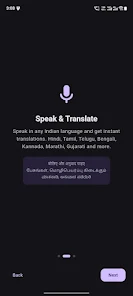
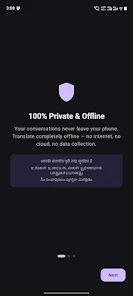
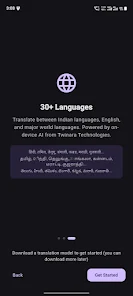
Twinara Translator puts private, on-device translation in your pocket and prioritizes privacy: voice, text and camera inputs are processed locally so conversations stay on your device and no ongoing internet connection is required after initial setup. The app supports major Indian languages including Hindi, Tamil, Telugu, Bengali, Kannada, Marathi, Gujarati and Urdu alongside more than 30 global languages for speech, text and camera translation, making it suitable for travel, study and everyday cross-language communication.
Key features
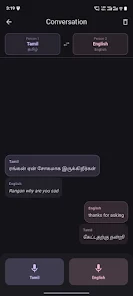
With a focus on practical use, the core features are designed for clarity and reliability. Speech recognition supports multiple Indian languages and recognizes natural phrases and code-mixed input such as Tanglish and Hinglish. Text translation handles typed or pasted phrases and works with local scripts. Conversation mode enables two people to exchange spoken phrases on one device with quick speaker switching. Camera translate uses offline OCR to turn signs, menus and printed text into instant translations without sending images to the cloud. Text-to-speech plays back translations with adjustable speed and clear pronunciation. The app stores a searchable translation history so you can revisit recent phrases and examples, and a dark theme reduces glare during night use.
How it works: controls and interaction
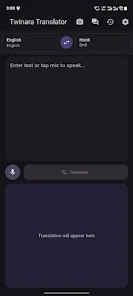
The interface is organized around a small set of intuitive controls: a microphone button to record speech, a text input field for typing, a camera button to scan written material, and language pickers to choose source and target languages. Conversation mode toggles into a two-way layout with alternating speaker indicators. Play and pause controls let you hear translations aloud; a speed slider adjusts voice rate to match learning needs. Downloads and language-pack management are accessed via a single menu so you can add or remove offline models and monitor storage use. Tooltips and short inline hints explain each control the first time you open them, helping new users get started quickly.
Progression, setup and storage
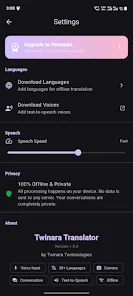
Rather than online streaming, the app relies on compact on-device models that are downloaded during an initial setup or added later as you need languages. This provides a progression-like experience: start with one core language pack for immediate use and add regional or global languages over time as your needs evolve. Downloads are incremental and can be paused or resumed, and the app reports estimated storage and download sizes so you can plan. Because processing happens locally, expect higher CPU and storage usage when models are active; we recommend performing large downloads on Wi-Fi and while charging to minimize interruptions.
Visual style and accessibility
The user interface emphasizes readable text, clear icons and generous spacing to reduce input errors on small screens. Adjustable font sizes and a high-contrast color option help users with visual needs. Text-to-speech supports natural-sounding voices and the adjustable playback speed improves comprehension for language learners and low-vision users. Camera translation includes automatic orientation correction and contrast enhancement to improve OCR accuracy for worn signs or low-light scenes.
Use cases, replay value and reliability
Twinara Translator is useful every time you encounter a language barrier: quick one-off translations for signs and menus, ongoing conversation assistance during meetings or travel, and practice for language learners who want to hear native-like pronunciations. The offline capability increases replay value because the same reliable translations are available without a network connection, and the local history acts as a compact phrasebook for repeated reference. Regular model updates deliver incremental improvements without changing how you interact with the app.
Limitations and subscription details
The app keeps everything local for privacy, but that design means some advanced features and the full set of 30+ languages are gated behind an affordable premium plan; upgrading to Twinara Translator Premium (currently ₹99/month) unlocks the highest-quality AI models, camera translate for OCR-heavy tasks, the complete language set and an ad-free experience. Be aware that on-device models require an initial download and will use device storage and processing resources; users with limited space should choose only the language packs they need. No cloud processing is used, and the app does not provide online multiplayer, ranking systems or server-based sharing.