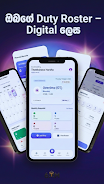
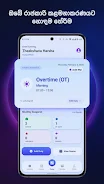
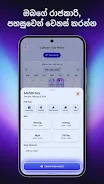
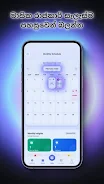
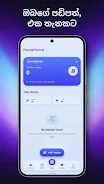
SLHRoster is a practical mobile roster tool designed for nurses, hospital staff and other healthcare workers who need a simple, reliable way to plan and track daily duties. SLHRoster places a compact monthly view and easy shift entry at the center of its workflow, so users can record Morning, Evening, Full Day and Night shifts, tag Off days, overtime (OT), public holidays (PH) and Normal Duty without wading through hospital administration interfaces. Built with straightforward scheduling in mind, the app emphasizes personal roster management and clear, quick access to upcoming obligations.
Key features
The app supports the common duty types used in many Sri Lankan hospitals and similar settings: Morning, Evening, Full Day and Night shifts are available as distinct entries, and each day can be flagged as Off, OT, PH or Normal Duty. A compact monthly duty calendar gives a single glance overview of the whole month so you can preview patterns and identify busy periods before they arrive. Duty entries are saved behind a secure login, and shift start and end times can be adjusted to match local conventions or personal preferences. The interface is intentionally uncluttered to make entry and review fast during busy shifts.
How it works
Using SLHRoster is straightforward: tap a date to add or edit a duty, choose the duty type, and adjust the shift times if needed. Saved entries appear in the monthly preview so that the next roster or swap day is easy to spot. The login protects your roster data so entries remain private to your device account, and the app is focused on day-to-day personal planning rather than centralized hospital rostering. SLHRoster also stores historical duty records so you can review previous months when needed for personal reference or handover notes.
User experience and controls
The user interface prioritizes clarity and ease of use on small screens: readable labels, distinct visual tags for different duty types and a calendar grid designed for quick scanning. Navigation is designed around common touch interactions so users can move between months and open days for detail without unnecessary steps. The app keeps controls lightweight so nurses and staff can enter or change a shift during short breaks, with minimal taps required to save an update.
Customization and planning
Shift times are adjustable to suit local schedules, allowing you to set realistic start and end times for each shift type rather than being constrained to fixed defaults. The monthly preview and immediate visibility of flagged Off, OT and PH days make it easier to plan swaps, requests or personal activities around work. Because SLHRoster is built for individual duty management, it is useful for maintaining a reliable personal roster, preparing for upcoming rotations and keeping a simple record of extra hours or holiday coverage.
Accessibility and reliability
SLHRoster aims to be accessible on a range of devices by keeping the visual design high contrast and the interaction model simple; text sizes and labels are intentionally clear to reduce reading time during busy shifts. The app requires only the permissions necessary to store and protect roster entries and is designed to be lightweight so it runs well on modest hardware. Your duty information is tied to the app account and secured by login, helping maintain privacy for individual schedules.
Intended use and limitations
SLHRoster is intended as a personal roster management utility rather than a full hospital administration or centralized scheduling system. It is tailored to the duty practices common in Sri Lanka and similar environments, so some workflows or expectations may differ in other regions or institutions. If your hospital uses a central rostering platform for automated team-wide scheduling, SLHRoster is best used alongside that system for personal planning and record-keeping rather than as a replacement for institutional scheduling infrastructure.