CookingTimerPro is a straightforward multi-timer utility built for cooks who juggle several dishes at once; CookingTimerPro places labeled, independent timers on your device so you can manage a weeknight dinner or a full multi-course meal without hovering over the stove. The app emphasizes clarity and reliability: each timer displays a clear countdown, and audible and visual alerts let you know when a step is done so you can focus on prep, plating, or moving between tasks. Whether you are timing a roast, steeping tea, or monitoring resting periods, CookingTimerPro is designed to reduce timing errors and keep the kitchen workflow under control.
Key features and how they work
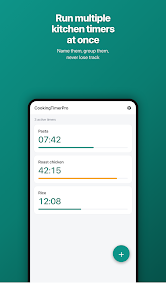
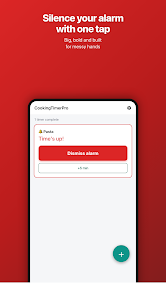
CookingTimerPro allows you to create multiple independent timers, each with its own name and duration so every dish or task is easy to identify. Timers can be started, paused, and reset individually, which makes it simple to handle staggered starts or to pause a single item without interrupting others. Each timer shows an easy-to-read numeric countdown and a clear visual cue when it is active or completed. Audible alerts and visual notifications are provided to draw attention when time runs out; these alerts rely on your device’s current sound and notification settings, ensuring they behave as you expect across silent and loud environments.
Controls and user interaction
The app uses simple tap controls to create a new timer, edit the label, and set or adjust the duration. Starting a timer is one tap, and pausing or resetting is equally direct so the interface keeps your hands free for cooking. Timers run independently, allowing you to monitor several preparations at once without having to switch views constantly. When a timer finishes, you receive both on-screen feedback and an optional audible cue so you can step away from the stove and return when an alert appears.
Progression and routine management
CookingTimerPro supports common cooking flows by making it easy to monitor overlapping tasks. Rather than relying on a single clock, you can stagger starts to match recipe steps and housekeeping: for example, start a longer roast first and add shorter side-dish timers later so everything finishes close together. This practical progression helps you coordinate multiple items and reduces the need for constant manual checking, effectively letting your planned sequence of tasks run on schedule with minimal intervention.
Visual style and readability
The interface is intentionally minimal and legible so information is available at a glance in busy kitchen conditions. Large, high-contrast text and clear countdowns keep the most important information visible from across the room. Visual indicators make it easy to tell which timers are active, which are paused, and which have finished, reducing ambiguity and saving time when you’re handling pots, pans, and prep bowls.
Customization and repeatability
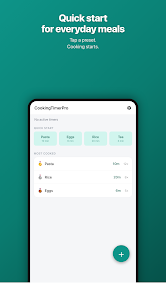
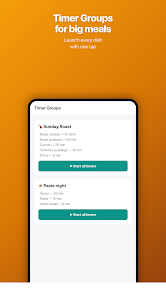
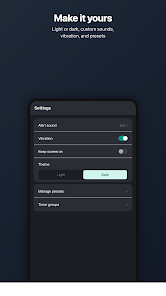
While the core experience is simple, the app supports routine use by letting you reuse timing patterns: once you’ve set up a set of timers for a familiar meal, re-creating that timing pattern is quick and intuitive. Labels and durations provide a straightforward organizational layer so you can repeat common sequences without rebuilding them from scratch every time you cook. This repeatability improves efficiency for frequent recipes and helps you refine timing across multiple sessions.
Accessibility, offline reliability, and device behavior
CookingTimerPro is designed to work reliably with your device’s clock, which means timers continue to function without an internet connection and across app restarts in ordinary usage. The app emphasizes readability and clear alerts so it remains useful in loud or dim kitchen environments; be aware that alerts depend on your phone’s notification and volume settings. Simple controls and large text increase accessibility for users who prefer a straightforward, focused tool rather than a crowded interface.
Practical tips and limitations
Use CookingTimerPro to keep multiple dishes organized and to build a predictable cooking rhythm, but remember the app measures elapsed time rather than food doneness: you still need to check internal temperatures and visual doneness where appropriate. Accurate input of durations is important; set timers according to trusted recipes or your own experience and adjust where needed. Alerts are most effective when your device sound and notification permissions are configured to let them be heard in the kitchen.
Why this tool fits into your kitchen
For home cooks and small kitchens, CookingTimerPro reduces the cognitive load of juggling multiple steps by providing labeled, independent timers that are easy to create and monitor. The combination of simple controls, clear visual feedback, and reliable timing behavior makes it a low-friction addition to everyday cooking routines and more elaborate meal preparations alike.