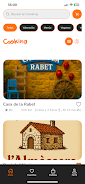
Cooking is a marketplace-style app that connects you with local kitchens preparing home-style meals, offering a practical alternative to supermarket shopping for everyday needs. The app helps you discover nearby providers, read what each kitchen typically prepares, and build simple routines around ready-made options that emphasize taste, nutrition, and value. Designed for straightforward use on phones and tablets, Cooking focuses on clear information, intuitive browsing, and service-oriented tools so you can add convenient, home-style meals into busy weekly plans without losing variety.
Key Features
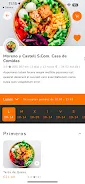
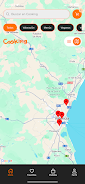
Key features include a searchable map of registered local kitchens, descriptive menus and sample items, and easy-to-read provider profiles that outline hours, typical portions, and pricing ranges. The app supports smart filters for dietary preferences and price sensitivity, photo galleries so you can preview meals, and saving functionality for the kitchens you want to check regularly. All of these elements are organized to help you compare options quickly and make informed choices instead of relying only on supermarket prepared foods.
How it works
Begin by allowing location access and browsing a neighborhood view that surfaces nearby kitchens and their recent menus. Each provider profile summarizes what is prepared there—traditional home recipes, daily specials, or diet-focused selections—so you can understand the types of meals available before contacting a kitchen. Where providers list scheduling or pickup details, the app displays contact methods and time windows so you can plan collection or ask about local delivery arrangements handled directly with the kitchen. The experience avoids unnecessary complexity: search, inspect a profile, save favorites, and follow up with the kitchen using the details provided.
Controls and navigation
Navigation relies on familiar mobile patterns: a persistent search bar, a map or list toggle, and contextual filters that narrow results by cuisine, price band, dietary tag, or distance. Tap a kitchen card to open a detailed view; swipe gestures and clear back controls make it easy to move between results. The interface emphasizes readable typography, prominent action buttons for saving or contacting a provider, and concise labels so first-time users can complete common tasks without a learning curve.
Progression and personalization
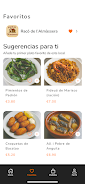
As you use the app, Cooking learns which kitchens and meal types you save and which filters you apply most often, allowing the home screen to prioritize relevant suggestions. Progression is practical rather than gamified: repeated use builds a personal list of reliable providers, streamlines weekly meal planning by remembering preferences, and shortens the time needed to find suitable options. Personalized recommendations and a saved-favorites view help you establish a dependable rotation of ready-made meals.
Visual style and structure
The visual approach is clean and photography-forward, with appetizing photos and concise captions that describe typical portion sizes and sensible price indicators. Content is organized by local area and meal category so you can browse by neighborhood, cuisine type, or occasions such as weekday lunches or family dinners. This structure supports both exploratory browsing—discovering new kitchens—and task-focused searches when you need a specific meal quickly.
Customization and accessibility
Customize the app with dietary filters, language preferences, and adjustable text sizes for readability. Accessibility considerations include high-contrast themes and properly labeled controls for screen readers where possible. Settings allow you to select notification preferences for updates from saved kitchens or temporary menu changes so the app adapts to your needs without being intrusive.
Offline and reliability
The app caches your saved kitchens and recent searches so you can view essential information when connectivity is limited. A low-bandwidth mode reduces image quality to speed browsing on slower networks, and provider details such as address, hours, and contact options remain accessible offline. These measures ensure the core discovery and planning features work reliably in everyday conditions.
Usage patterns and replay value
Cooking is built for repeated, practical use: many users return weekly to check rotating menus, seasonal specials, or to re-order from trusted local kitchens. The app encourages exploration by surfacing new or nearby providers over time while keeping your saved list handy for routine planning. Because offerings and schedules change, there is ongoing value in rechecking the app to discover fresh options that fit changing tastes or budgets.
Advantages
Cooking offers an accessible way to incorporate more home-style meals into regular eating habits, supports local cooks and small providers by increasing visibility, and often uncovers more affordable or nutritious options than typical supermarket prepared foods. The straightforward interface and personalization features make it simple to build a dependable roster of kitchens that match your routine and preferences.
Disadvantages
Availability depends on local participation: not all neighborhoods will have many registered kitchens, and selections reflect each provider’s schedule and capacity. Because the app primarily aggregates information about independently operated kitchens, menu variety and pickup or delivery options will vary by provider and may be limited on certain days.