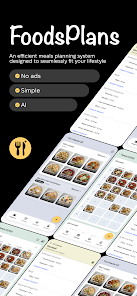
FoodsPlans helps you stop wasting time deciding what to eat by turning recipes and everyday meals into an organized, shareable plan. Save your favorite dishes, build weekly menus in minutes with a simple drag-and-drop planner, and let AI generate a ready-to-shop grocery list grouped by category. The app skips calorie counting and macro tracking, so it's aimed at people who want to eat better without the diet fuss. Whether you cook for one, share meals with a partner, or manage a family kitchen, FoodsPlans reduces decision fatigue and makes grocery shopping faster.
Key Features
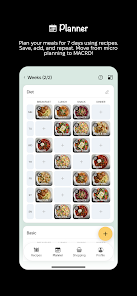
Save and organize dishes into custom lists with fast search; upload photos or generate attractive images using AI. Create flexible weekly plans with drag-and-drop meal slots, swap meals easily, and prepare multiple weeks in advance. Generate AI-powered grocery lists from any planned week, adjust quantities by number of people, and receive items grouped by store category. Share dish lists and allow others to subscribe so family members always see the latest menus and updates. FoodsPlans offers a bilingual interface with English and Ukrainian support for broader usability.
Advantages
Fast meal planning removes guesswork and saves time during busy weeks. Smart grocery lists help reduce impulse purchases by organizing items by store sections. A simple, non-diet approach focuses on practical meal organization rather than tracking calories. FoodsPlans works for individuals, couples or families and includes sharing and subscription options for collaborative planning.
Disadvantages
The free tier is limited: save up to 21 dishes, plan up to two weeks, get two AI grocery lists per month and ten AI images per month. Full access requires a Premium subscription to unlock larger limits for dishes, weeks, grocery lists and generated images. The app does not include calorie and macro tracking, so it may not suit users looking for detailed nutritional monitoring.