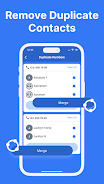
Phone Cleaner is a lightweight utility built to reclaim storage and tidy Android devices by finding duplicate photos and videos, clearing junk and temporary files, and consolidating repeated contacts. Phone Cleaner automates scanning and provides clear results so you can free space, improve responsiveness, and keep media organized without manual sorting. The app also includes a free built-in VPN to protect privacy on public Wi‑Fi and offers straightforward, one‑tap cleanup controls for everyday maintenance.
Key features and what they do
The duplicate media detector locates identical and near‑identical photos and videos so you can remove redundant items and recover gallery space. Contact consolidation identifies repeated entries and offers safe merge suggestions to streamline your address book. Junk file cleaning targets cache, temporary files, and leftover installation packages to reduce clutter. A choice of quick or deep scans lets you balance speed and thoroughness: quick scans analyze common cache locations for immediate gains while deep scans examine larger folders and media collections for a more complete cleanup. The included VPN provides encrypted connections on public networks; note that the VPN is optional and the core cleaning tools operate offline.
How scanning and progression work
Scans run in staged passes so you can see progress as Phone Cleaner evaluates storage categories, media collections, and contact lists. After a scan completes, results are grouped by type (duplicates, junk, large files, repeated contacts) with estimated recoverable space and suggested actions. This progression model helps you prioritize what to clean first and track cumulative space saved over time. You can rerun scans at any time to monitor how much storage has been freed and to detect newly created duplicates or cache files.
Controls, interface and customization
The interface focuses on simple, clearly labeled controls: run a one‑tap cleanup, choose quick or deep scan, and preview suggested deletions before confirming. Phone Cleaner exposes adjustable filters so you can exclude folders, set minimum file sizes, narrow by date ranges, or tune the similarity threshold for duplicate detection. Contact merge settings allow you to review suggested matches and pick which fields to keep. Lightweight animations and readable icons make status and results easy to interpret on phones of all sizes.
User experience, accessibility and offline behavior
Phone Cleaner is designed for low friction: the app works primarily offline for scanning and cleaning operations, preserving privacy and reducing data use. Accessibility considerations include readable labels, high‑contrast elements, and support for system accessibility services so screen readers can navigate results. The app also offers battery‑friendly behavior by pausing deep scans when the device is low on power and provides clear explanations of required permissions so users understand why storage and contacts access is necessary for full functionality.
Safety, review steps and challenge handling
To prevent accidental removals, Phone Cleaner presents a preview of items selected for deletion and keeps a temporary recycle area (undo within a limited time) so you can restore something removed by mistake. Duplicate detection can sometimes flag similar images that are not exact copies; the app highlights similarity scores and lets you inspect each pair before confirming deletion. These manual review steps give you control while still speeding up the cleanup process compared with fully manual sorting.
Customization, scheduling and replay value
Regular maintenance is encouraged: Phone Cleaner lets you save scan preferences and run them repeatedly to keep storage tidy. While the app’s core functions are instantaneous and useful on first run, scheduling or repeating scans uncovers new duplicates and cache buildup over time, which increases the long‑term value of the app. Saved presets and notification settings allow the app to remind you when storage is getting low so routine upkeep becomes part of device maintenance rather than a one‑off chore.
Limitations and privacy notes
Phone Cleaner requires permission to access storage and contacts to identify duplicates and perform merges; these permissions are used locally on your device for analysis and cleanup. The duplicate detector may require occasional manual review for borderline cases, and the VPN feature is optional and intended to enhance privacy only when enabled. The app keeps a simple, transparent interface without intrusive advertising, focusing on giving you control over what is removed and why.
Who will benefit
If you keep a large photo library, frequently install and remove apps, or accumulate contact duplicates over time, Phone Cleaner can speed up maintenance and help reclaim storage so your device runs smoother. Its combination of offline cleaning tools, optional VPN, and user‑controlled previews makes it practical for everyday users who want a safe, efficient way to manage storage without spending hours sorting files manually.