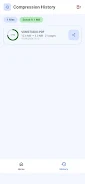
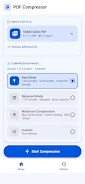
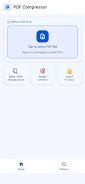
PDF Compressor is a lightweight Android utility that quickly reduces the size of PDF documents while preserving text clarity and image quality. Designed for people who need to free storage or send large reports and scanned files, PDF Compressor applies advanced processing to shrink files in seconds with a simple tap. The app improves scanned pages by enhancing contrast and removing noise, and it offers multiple compression profiles so you can balance quality and size. All processing runs locally on your device, keeping sensitive documents private while making them far easier to store and share.
Key Features
⚡ One-tap ultra-fast compression: PDF Compressor shrinks large PDFs in seconds and prepares files for sharing via email or messaging apps.
⚡ Advanced image processing powered by OpenCV, including 1-bit binarization filters to clean scanned pages, boost contrast, and remove noise.
⚡ Flexible compression levels (Low, Medium, High) let you choose the right trade-off between visual quality and file size.
⚡ Privacy-first design with all processing performed locally on your device, so documents are never uploaded to external servers.
⚡ Modern interface built with Jetpack Compose and Material 3 for a smooth, responsive experience.
Advantages
✅ With PDF Compressor you can dramatically reduce storage use and make large documents simpler to archive and send.
✅ Preserves text clarity and image quality so scanned pages and reports remain readable after compression.
✅ Fast results that let you compress and share documents on the go without lengthy waits.
✅ Simple controls and multiple presets make it easy to tailor output to your needs.
Disadvantages
❎ No cloud-based compression or online syncing options, since all processing is local by design.
❎ Compression effectiveness depends on the original file: PDFs with complex images or embedded objects may not shrink as much.
❎ Power users may find limited advanced or enterprise features compared with desktop solutions.