DejaOffice CRM with PC Sync is a mobile CRM that consolidates contacts, calendar, tasks and notes into a single offline-capable app and stores records locally for fast widgets and searches. It pairs with a companion PC sync tool so desktop and mobile information stay aligned, and it is designed for users who prefer local control of their data and reliable on-device performance rather than cloud-only solutions.
Key Features
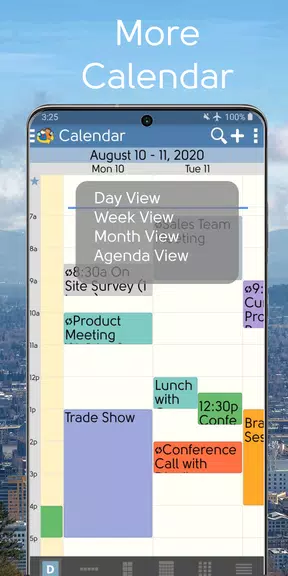
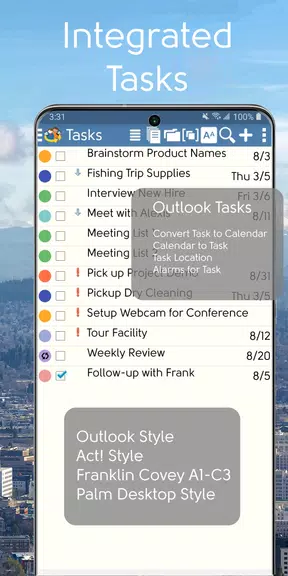
DejaOffice CRM with PC Sync mirrors desktop contacts, calendar, tasks and notes through a companion PC sync application to keep information coordinated between devices. Advanced contact sorting supports first name, last name, company and category order and includes a color-coded category manager for quick organization. The calendar offers six views—day, week, compact week grid, month, year and list—to match different planning styles. Task management supports multiple approaches including GTD and Franklin Covey as well as classic list formats, and the app supports up to 20 custom fields to capture extra details. Security and reliability features include password-protected private records, optional database encryption, automatic backups and a fast global search.
Advantages
DejaOffice CRM with PC Sync is free to use and contains no ads, with development supported by related companion PC sync product sales. Local data storage delivers responsive widgets such as a daily agenda, month view, contact list and notes, and it provides reliable offline access when connectivity is limited. Synchronization options are flexible and include USB, Wi-Fi, Bluetooth or an optional cloud sync service through the companion PC sync software. Strong security features and automatic backups help protect sensitive information.
Disadvantages
PC synchronization requires a separate companion PC sync application and some advanced sync features may require purchasing that product after any trial period. Initial sync setup can be more involved than a cloud-only CRM because device-to-PC connections and optional cloud sync must be configured, which may require extra steps for first-time setup.