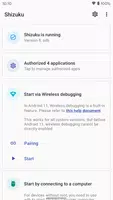
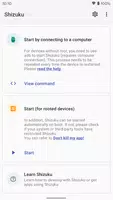
Shizuku is an Android utility that lets you start a background service using wireless debugging, offering a cable-free startup option on supported devices. It appeals to users who need a convenient way to activate a service without connecting a computer, particularly on Android 11 and newer where wireless debugging is available. The package includes a user guide, source code and a developer guide for those who want implementation details or to extend functionality. Keep in mind that, because of system limitations, the wireless startup sequence must be repeated after each reboot.
Key Features
⭐ Start Shizuku via wireless debugging on Android 11 or above without a USB cable.
⭐ One-time pairing workflow: initiate pairing from the app and complete it with the device pairing code.
⭐ Enter the pairing code in Shizuku's notification to finish pairing quickly and securely.
⭐ Guides and source code are provided so developers can inspect or extend the tool.
⭐ If the service does not start, disabling and re-enabling wireless debugging is a simple recovery step.
Advantages
✅ No computer required to start Shizuku when using the wireless debugging method on supported devices.
✅ Pairing only needs to be performed once, easing subsequent connections.
✅ Clear on-device flow: enable Developer options, enable USB Debugging, then enable Wireless debugging to get started.
✅ Troubleshooting is straightforward — toggle wireless debugging if the service fails to start.
Disadvantages
❎ Wireless startup requires Android 11 or newer, so older devices cannot use this method.
❎ System limitations force the wireless startup steps to be repeated after every reboot.