Vibesnap translates moments and moods into music so you can create playlists from a photo, a short text description, or an uploaded image; point your camera at a sunset, capture a candid street scene, or type a one-line mood and Vibesnap analyzes color, atmosphere and emotional cues to suggest songs that match how you feel. The app is designed for people who want a fast, creative bridge between imagery and sound, whether you are a photographer looking for background tracks, a traveler who wants a soundtrack for a trip, or someone who enjoys an instant, personalized playlist for everyday life or special moments.
Key features and controls
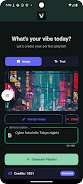
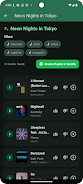
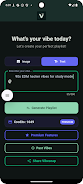
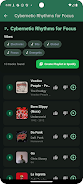
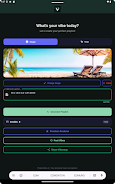
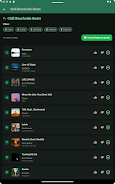
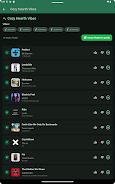
Vibesnap’s main screen places camera, upload and text-entry controls side by side so you can switch input modes in one tap; capture a photo with the in-app camera, choose an image from your device gallery, or type a short prompt to describe a feeling. After you submit an image or phrase, a concise progress indicator shows which visual and tonal cues the app’s multi-modal AI is evaluating, and the resulting playlist is presented with track previews and contextual notes explaining why each selection fits the mood. A single export button connects the generated playlist to your preferred streaming music account for immediate listening, and basic editing tools let you reorder, remove or save tracks before export.
How the generation works
The playlist creation process combines visual analysis and natural language interpretation: colors, contrast, lighting and detected scene elements help define a mood profile, while short text inputs refine tempo, energy and genre preferences. Vibesnap’s suggestions are designed to balance recognizable tracks with discovery picks that complement the image’s atmosphere, and each generated list typically includes a mix of familiar and new songs so playlists feel fresh without being jarring. The app displays short explanations for selections so users understand the connection between an image or phrase and the music choices.
Progression, credits and personalization
Free users operate under a credit system that regulates how many automatic generations can be made without upgrading; you can buy additional credits or choose a premium subscription for unlimited, ad-free generation and deeper personalization options. Over time Vibesnap adapts to your listening history and the edits you make to suggested playlists, refining future recommendations to better reflect your taste. Saved playlists and personalization settings create a persistent profile that the app consults when assembling new lists, and subscribers gain access to advanced controls such as mood intensity sliders and preferred-genre weighting.
Customization and replay value
The app encourages experimentation because small changes to input—cropping an image differently, altering a descriptive word, or switching from day to night photos—produce noticeably different playlists. You can name and organize collections of playlists for projects, trips, photo albums or mood sets, and the in-app editor allows manual adjustments to order and track choices so every saved playlist becomes a reusable template. This makes Vibesnap useful both for one-off inspiration and for building themed music libraries that evolve as your visual work and tastes change.
Visual style and user experience
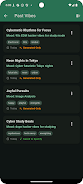
Vibesnap presents a clean, photo-forward interface that highlights the image being analyzed and offers clear, readable text for suggestions and controls. The design prioritizes quick interactions: large tap targets for capture and export, preview snippets for each suggested song, and unobtrusive contextual help for new users. Color-coded mood tags and thumbnail previews help you scan results quickly, while a compact history view lets you revisit previous generations without repeating inputs.
Accessibility, offline use and privacy
The app includes accessibility options such as adjustable text sizes, voice-over compatibility for core actions, and simplified controls for streamlined use. Playlists you create are saved locally and can be accessed from the app’s library; actual offline playback depends on the policies of the connected streaming service, while saved lists remain visible even when you are temporarily offline. Vibesnap processes images and text securely on-device where possible and provides clear settings for account connections and data use so you can manage privacy preferences.
Limitations and practical notes
Exporting playlists requires connecting a streaming account, and some advanced personalization features are reserved for premium subscribers. The free tier is ad-supported and limited by credits, which makes it well suited for casual exploration but not for heavy daily use unless you choose to upgrade. The app is intended as a creative companion rather than a replacement for manual playlist curation, and it works best when used iteratively—try small adjustments to inputs to discover different musical directions.
Whether you want to pair a photo shoot with background music, create a travel soundtrack from your vacation images, or quickly set a mood while editing visual content, Vibesnap provides an intuitive, image-driven approach to music discovery that grows more personal the more you use it.