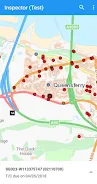
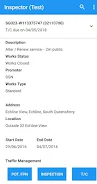
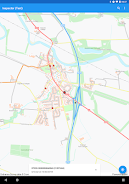
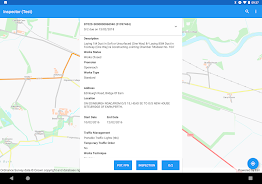
Inspector Inspector Inspector is a specialized application for registered SRWR users that lets professionals record Inspection Result transactions directly on the SRWR system. Inspector is intended for authorized personnel who must enter formal inspection outcomes tied to their official SRWR accounts; to gain access and register to use Inspector, contact the SRWR Hosted Support team for account setup and guidance. The app focuses on accurate submission of official inspection records, clear auditability and a compact, task-oriented interface that supports routine fieldwork and office workflows alike.
Key Features
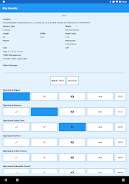
The core capability of Inspector is direct entry of inspection results into the central SRWR database so records remain linked to the submitting user’s SRWR account. Inspector validates required fields before submission to reduce errors, attaches timestamps and submitter identifiers for traceability, and enforces access control by only permitting authorized SRWR registrants to create official transactions. The app groups common inspection fields into logical forms, provides clear status feedback for each record, and offers registration and technical support coordinated through the SRWR Hosted Support team.
How it works
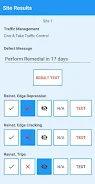
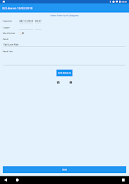
Inspector follows a simple, step-based workflow: create a new inspection entry, complete the required form fields, review the entry for completeness, and submit the record to SRWR. The controls are optimized for touch input: form controls use familiar date and time pickers, dropdown selectors for standardized codes, and inline validation that highlights missing or inconsistent values. Each submitted inspection produces a confirmation and an identifier that users can reference in follow-up work or audit queries.
Data integrity and progression
Records created with Inspector are designed to remain auditable. The app captures a clear progression for each inspection entry from draft to official submission, preserving timestamps and submitter details. If an entry needs correction, the app records revisions and status changes so organizations retain a traceable history of what was entered and when. This progression supports organizational audits and helps ensure consistent record keeping across multiple inspectors and offices.
Usability and visual design
Inspector provides a straightforward visual layout focused on legibility and efficient data entry. The user interface uses clear labels, consistent spacing and responsive layouts that adapt to different phone and tablet screens. Common actions are placed within easy reach to reduce repetitive tapping during busy inspection sessions, and inline help text explains the purpose of each field so users can complete forms with confidence.
Offline and submission behavior
Because Inspector writes official Inspection Result transactions to the SRWR system, network connectivity is required for immediate submission. The app supports a save-and-review workflow so users can prepare entries offline and finalize or submit them when a reliable connection is available; locally saved drafts remain under the user’s control until they choose to submit. This approach helps professionals continue working in areas with intermittent connectivity while ensuring that official records are only committed when authorization and network conditions permit.
Security and access control
Inspector relies on SRWR account authorization to restrict access. Only users who have completed SRWR registration and been enabled for inspection transactions can submit official results. Communications between the app and the SRWR system use secure transport and follow standard practices to protect data during submission. Activity logging and identification of the submitting account help maintain accountability for official records and support organizational compliance needs.
Customization and workflow fit
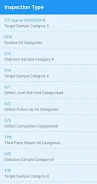
Inspector is designed to fit into varied inspection workflows by letting organizations and users prioritize commonly used fields and by preserving frequently entered values as defaults where appropriate. The app supports multiple inspection types so users can select the appropriate inspection template at the start of each session, helping standardize data collection across teams and simplifying training for new inspectors.
Accessibility and device support
The app aims to be accessible to a broad range of users: text sizes and contrast levels are chosen for readability, controls are reachable for one-handed operation, and the interface follows predictable navigation patterns that work with Android accessibility tools. Inspector is intended for Android devices supported by the SRWR environment; administrators and users should consult the SRWR Hosted Support team for recommended OS versions and device guidelines.
Support and common use cases
Typical use cases for Inspector include formal inspection reporting, preparation of records for audits, field-to-office handoffs and routine compliance checks that require entries to be recorded under an official SRWR account. For setup, registration, troubleshooting or questions about mapping inspection fields to organizational requirements, contact the SRWR Hosted Support team to get assistance with account access and configuration. Inspector helps streamline the submission of inspection outcomes while maintaining the controls and traceability required for official records.