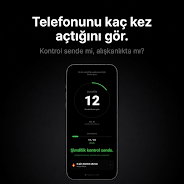
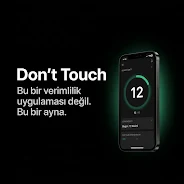
Don't Touch is a focused unlock counter and minimalist habit-tracking utility that records every time you wake or unlock your phone and displays those interactions as straightforward, date-stamped data. Don't Touch places a clear emphasis on measurement rather than advice: it quietly logs unlocks, surfaces daily totals, and presents short-term trends so you can accurately assess how often you reach for the screen. The app is intentionally simple: no coaching, no gamified levels, just a precise mirror of your device interactions to support mindful device use.
Key features and how they work
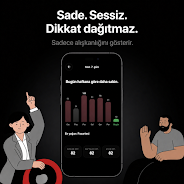
The live tracking engine runs in the background and increments a counter each time the device transitions from locked to unlocked, capturing a timestamp for every event so you can inspect when checks happen during the day. A configurable daily limit acts as a personal boundary; when you exceed that cap the app provides a clear visual signal to make the overage obvious at a glance. The main view summarizes today, shows a compact list of recent unlock timestamps, and provides easy access to a seven-day overview that highlights peaks and quiet periods.
Controls and interaction model
Controls are deliberately minimal: configure limits and display options from a single settings screen, toggle whether timestamps appear in 12- or 24-hour format, and choose whether the app runs on boot to ensure tracking resumes automatically. Primary interaction is read-only for daily use: open the app to review counts and charts, adjust your limit if needed, or clear data for a fresh start. There are no intrusive pop-ups; signals for exceeding a limit are subtle and designed to respect your focus.
Analytics, progression and measurable change
Progression in Don't Touch is represented by measurable shifts in frequency and averages rather than levels or badges. The analytics focus on daily, weekly and monthly averages so you can chart gradual change over time and spot persistent patterns such as evening spikes or weekday versus weekend differences. Premium charts offer deeper visual breakdowns for those who choose to upgrade, but the base app provides enough context to understand whether your interaction rate is trending up or down and to set informed personal goals.
Visual style, accessibility and user experience
The application uses a dark, distraction-reducing interface with high-contrast text and large numeric readouts so the most important information — your unlock count — is immediately legible. Accessibility is considered through adjustable font sizes and clearly labeled controls. The design avoids animations and bright colors that could trigger reflexive checks, reinforcing the app's intent to be a neutral mirror rather than a stimulus generator.
Customization, offline use and reliability
Customizable options include the daily cap value, the time window used for weekly summaries, and whether to include partial days when calculating averages. Don't Touch stores data locally on the device so it works fully offline and preserves privacy by default; logs remain on your phone unless you choose to delete them. Because tracking is lightweight, battery impact is minimal and the app is suitable for continuous daily use.
Limitations and expected behavior
Don't Touch concentrates strictly on unlock counting and deliberately does not track app-level screen time or the content you view after unlocking. It also does not include guided coaching, motivational programs, or social features; the goal is to provide honest, unobtrusive data rather than behavioral training. Some advanced visualization options are marked as premium, which may limit access to detailed charts for users on the free tier.
For people who want a sober, data-first way to notice and measure checking habits, Don't Touch offers a compact toolset: reliable unlock logging, clear daily limits, straightforward trend displays, and a dark, low-distraction interface that supports reflection without pressure. Use it as a measurement baseline to inform any further steps you might take toward reducing habitual phone checks.