Scan Match is an industrial-grade verification app that compares two QR codes or barcodes to confirm they reference the same item. Built for shop floors, warehouses, and inspection stations, Scan Match focuses on dual-tag validation workflows where confirming a pair of tags is critical to traceability and error reduction. The introduction below explains how the app works, how operators interact with it, and what to expect during routine checks.
How it works
The core workflow is simple and deterministic: scan the first tag, scan the second tag, then let the app perform a direct string and format comparison to determine whether the two tags match. Scan Match supports common 1D and 2D symbologies so it can be used with printed barcodes, QR codes, and many industrial label formats. The comparison logic includes configurable tolerances for character formatting and common prefix rules, allowing teams to handle minor formatting differences without producing false negatives.
Controls and user interactions
Operators interact with the app primarily through the device camera or a connected hardware scanner if one is available. The interface presents clear on-screen prompts for each step of the validation sequence: Capture Tag A, Capture Tag B, and View Result. Controls are optimized for quick repeatability — large, high-contrast buttons, an optional continuous-scan mode for batch validation, and a one-tap retry when scans are incomplete or obscured. Where devices provide hardware scan buttons, Scan Match recognizes those inputs to speed up hands-on workflows.
Progression and workflow structure
Rather than game-like levels, Scan Match organizes work into repeatable stages that mirror typical inspection tasks. A single verification cycle consists of identification, pairing, confirmation, and optional logging. For higher-volume tasks, the app supports queued sessions so users can process a batch of paired validations in sequence without returning to the main menu. Operators can also lock a session to a single production run or workstation to keep verification data segmented by shift or line.
Customization and validation rules
Scan Match offers customization to fit different manufacturing rules and labeling conventions. Administrators can enable or disable specific symbologies, set character normalization rules (for example, ignore leading zeros or standardize dashes), and define pass/fail criteria based on exact match or normalized match. The app also allows configuration of post-check actions such as require confirmation, flag for supervisor review, or mark an item for rework, enabling teams to adapt Scan Match to established procedures without changing hardware or label design.
Visual style and user experience
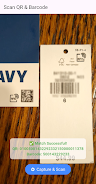
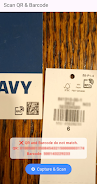
The visual design is purpose-driven and uncluttered: high-contrast text, clear success/failure indicators, and a camera view that emphasizes target alignment. Feedback is immediate and unambiguous — a clear green confirmation when tags match and a distinct red alert when they do not, accompanied by a concise reason field explaining mismatches. This approach reduces operator uncertainty and keeps checks consistent under varied lighting and noise conditions commonly found on production floors.
Accessibility and offline capability
Accessibility considerations include adjustable font sizes, voice feedback for confirmation status, and a simplified mode for users who only need the most essential controls. Scan Match is designed to operate offline for environments where network connectivity is intermittent or restricted; all validation logic runs locally so teams can complete verifications without depending on external servers. Local audit logs are retained on the device for traceability and can be exported through standard device utilities when connectivity is available.
Replay value and routine use
While the app’s purpose is practical rather than recreational, Scan Match delivers strong repeat value through reliable, repeatable checks that reduce rework and shipping errors. Routine use across shifts improves data consistency and, over time, helps organizations pinpoint recurring labeling problems. The app’s batch session and queued processing modes preserve operator time and reduce cognitive overhead for high-volume verification tasks.
Limitations and recommended environment
Scan Match is specialized for dual-tag validation and is not a full inventory management system. It performs best with clean, legible barcodes or QR codes and benefits from established scanning procedures and label standards. Users should ensure adequate lighting and stable camera alignment for optimal results. For organizations needing broader asset management or integration with enterprise resource planning tools, Scan Match can serve as a focused verification component alongside other systems.
Overall, Scan Match provides a dedicated, configurable solution for teams that require accurate pairing of physical tags, helping to standardize verification steps, reduce mismatches, and maintain traceability on the production floor.