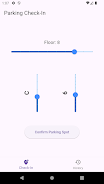
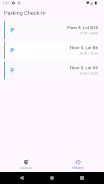
Parking Check-In is a compact utility designed to record where you parked by saving the parking lot number and the basement floor or level so you can quickly find your vehicle later. Parking Check-In keeps the focus on straightforward, reliable note-taking: a few taps to capture the lot identifier and level, and an easy retrieval process when it is time to return. The app is intended for drivers who want a lightweight tool that eliminates the fuss of larger location-tracking apps and concentrates on the single task of remembering a parking spot.
Key Features
The core functionality centers on a simple check-in form where you enter the parking lot number and the basement floor. Saved entries appear in a compact history so you can pull up the last place you parked without scrolling through unrelated data. Each saved record can include a short text field for extra context such as a nearby store name, a row number, or a color-coded section that helps you recognize your zone when you walk back. The app keeps these records locally on your device, so you do not need an internet connection to save or view them.
How It Works and Controls
Using Parking Check-In is deliberately intuitive: open the app, tap the check-in area, type the lot number and floor, and press save. Retrieving your entry is just as simple — open the recent list and tap the saved record to view details. The interface relies on common Android controls like text fields, save buttons, and a chronological list for past check-ins, so there is little to learn before the app becomes part of your routine. Editing and deleting saved spots are done from the history view, keeping management of entries straightforward and predictable.
Progression, History and Replay Value
Rather than a game-like progression system, Parking Check-In offers practical progression through a short history of saved spots. This history acts like a personal log: frequent users will accumulate a recent list that reflects daily errands, work commutes, or weekend visits. The value of the app increases with regular use because the history provides quick context for recurring locations, helping you recognize patterns (for example, which floor you typically use at a particular mall) and saving time on future trips.
Visual Style and Customization
The design emphasizes clarity and minimalism: large text fields, high-contrast labels, and a tidy list view that highlights the most recent check-in. Settings allow basic personalization such as adjusting text size and choosing whether a short note field is shown by default when you check in. These small options preserve the app’s lightweight feel while letting you tune the interface to your eyesight and usage habits without adding clutter.
User Experience and Accessibility
The app aims to be easy for a wide range of users by keeping interactions simple and predictable. Buttons are sized for one-handed operation, and form fields are labeled with plain language to reduce mistakes under pressure. Because data is stored locally, Parking Check-In works offline and remains responsive even in basements or parking structures with poor reception. The straightforward UI also makes it compatible with Android accessibility features like larger fonts and screen readers, improving usability for drivers who need assistive settings.
Limitations and Intended Use
Parking Check-In is intentionally focused on manual entry and retrieval of basic parking details; it does not track GPS coordinates, provide indoor mapping, or offer automatic location detection. That simplicity is by design: if you prefer a quick, privacy-friendly notebook for parking locations that does not depend on permissions or background services, this app fits the need. Keep in mind that successful use depends on remembering to check in at the time you park and on the accuracy of the details you enter.
Practical Tips
To get the most from Parking Check-In, make a habit of tapping the app as you step away from your vehicle so your entry is fresh and precise. Use the note field to jot down nearby landmarks or row numbers, and edit the saved record if you notice a typo before you leave the lot. Over time the concise history will help you move through busy garages faster and with less stress.